
The best smart home system depends on your ecosystem, automation needs, compatible devices, and budget, but the Amazon Echo Hub stands out as the strongest dedicated control panel among these picks. Home Assistant Green is the better choice for advanced automation, while Apple HomePod mini and Google Nest Hub Max make more sense for users already invested in Apple or Google devices.
This comparison covers six smart home hubs and displays across Amazon Alexa, Google Home, Apple Home, and Home Assistant. It looks at setup, compatibility, automation, displays, voice control, pricing, and the features that matter when building a connected home.
Which Is the Best Smart Home System?
The Amazon Echo Hub is the best smart home system choice for most readers who want a dedicated control panel, while Home Assistant Green is better for advanced automation and customization.
The right choice still depends on the ecosystem already used in the home. Apple users may prefer the HomePod mini, while Google users can get more value from the Nest Hub Max. Alexa households have several options, including the Echo Hub and two Echo Show 8 models.
Related Posts
 | Best Smart Home Devices for Beginners: 8 Top Picks |
 | Smart Devices for Home: 16 Best Picks for 2026 |
 | Best Home Office Desk for Multiple Monitors (2026) |
Quick answer: Choose the Amazon Echo Hub for a dedicated smart-home control screen, Home Assistant Green for advanced automation, Apple HomePod mini for Apple households, and Google Nest Hub Max for Google Home users.
Best Smart Home Systems at a Glance
| Product | Best For | Key Highlight | Amazon |
|---|---|---|---|
| Amazon Echo Hub | Dedicated smart-home control | Customizable 8-inch control panel | View on Amazon |
| Google Nest Hub Max | Google Home households | 10-inch smart display | View on Amazon |
| Amazon Echo Show 8 | Alexa entertainment and control | 8-inch display and built-in hub | View on Amazon |
| Apple HomePod mini | Apple users | Siri and Apple ecosystem integration | View on Amazon |
| Amazon Echo Show 8 Newest Model | Updated Alexa smart display | 8.7-inch display and AZ3 Pro chip | View on Amazon |
| Home Assistant Green | Advanced automation | Dedicated Home Assistant hardware | View on Amazon |
Before choosing a hub, it also helps to understand the wider range of devices that can become part of a connected home. Our guide to smart devices for the home is a useful next step if you are still building your device list.
Amazon Echo Hub: Best Dedicated Smart Home Control Panel
Best For: Homeowners who want a dedicated screen for controlling smart-home devices, cameras, routines, and other connected equipment.

AMAZON
Amazon Echo Hub (newest model), 8", Redesigned with customizable control and Alexa+, Compatible with thousands of devices
The Amazon Echo Hub is the article's strongest choice for dedicated smart-home control. Its 8-inch display, customizable dashboard, camera controls, routines, Alexa+, and compatibility with thousands of devices make it a practical central control panel.
Who Should Buy It
Best for Alexa households that want a dedicated screen for controlling smart-home devices, cameras, lights, plugs, locks, and routines. It also suits families that prefer visual controls instead of managing everything from a phone.
Why We Pick It
It earned the top spot because its design focuses specifically on smart-home control rather than treating home automation as an extra feature. The customizable dashboard also makes frequently used controls easier to access.
Features & Benefits
| Feature | Benefit |
|---|---|
| 8-inch display | provides a dedicated visual interface for smart-home controls |
| Customizable dashboard | lets users organize controls and widgets around household needs |
| Alexa+ | enables Alexa-based voice assistance and smart-home interaction |
| Smart-home compatibility | supports control of thousands of compatible devices |
| Routines | combines multiple smart-home actions into automated sequences |
Pros & Cons
| Pros | Cons |
|---|---|
| ✓ Dedicated smart-home control panel | ✕ Less focused on general entertainment than Echo Show models |
| ✓ Customizable dashboard | ✕ Advanced automation users may prefer Home Assistant Green |
| ✓ Broad device compatibility |
The Amazon Echo Hub is the strongest choice in this group for readers who want a screen designed primarily around smart-home control. Its supplied product information highlights an 8-inch display, customizable dashboard, camera controls, routines, and Alexa+.
Unlike a general-purpose tablet, the Echo Hub is positioned as a central control point. You can organize controls and widgets around the way your household uses its smart devices.
The supplied listing also states that the Echo Hub works with thousands of devices. That makes it particularly useful for homes that already contain several connected products.
Why the Echo Hub Works Well as a Smart Home Controller
The biggest advantage is its dedicated control-panel design. Instead of opening an app every time you want to change a light or check a camera, the relevant controls can remain visible on the dashboard.
That approach is useful in kitchens, hallways, living rooms, and other shared spaces. It also makes the system easier for family members who do not want to manage every device from a phone.
The Echo Hub can also handle routines. A single routine can combine several actions, making automation easier to use once the compatible devices are connected.
Who Should Buy the Echo Hub?
The Echo Hub is a strong fit for Alexa households that want a dedicated smart-home interface. It is especially appealing when cameras, lights, plugs, locks, thermostats, and routines need to be accessible from one screen.
However, buyers who want deep customization and an open automation environment may prefer Home Assistant Green instead.
Google Nest Hub Max: Best for Google Home Users
Best For: Google Home households that want a large smart display for home control, entertainment, and voice assistance.

Google Nest Hub Max 10" Smart Display with Google Assistant - Chalk
The Google Nest Hub Max is the article's leading Google-focused smart-home display. Its 10-inch screen, Google Assistant, camera, and Google Home controls make it useful for connected-home management, entertainment, and everyday household tasks.
Who Should Buy It
Best for households already invested in Google Home and Google services. It also suits users who want a larger display for smart-home controls, entertainment, calendars, and visual information.
Why We Pick It
It earned a place because it provides a large visual interface for Google Home while combining smart-home control with broader household features. The 10-inch display also gives controls more room than smaller smart displays.
Features & Benefits
| Feature | Benefit |
|---|---|
| 10-inch display | provides a large visual interface for smart-home controls and media |
| Google Assistant | enables voice-based control and assistance |
| Google Home integration | lets users control compatible lights, TVs, locks, speakers, and other devices |
| Built-in camera | supports video communication and camera-based household features |
Pros & Cons
| Pros | Cons |
|---|---|
| ✓ Large 10-inch display | ✕ Less suitable for Apple-focused households |
| ✓ Strong Google Home integration | ✕ Larger footprint than compact smart speakers |
| ✓ Versatile smart display |
The Google Nest Hub Max is the strongest Google-focused option in this group because its 10-inch display gives smart-home controls more room than smaller smart displays.
The supplied product information lists a 10-inch display and Google Assistant. Google also describes the Nest Hub Max as a device that can control compatible lights, TVs, locks, speakers, and other smart-home equipment from one place.
That makes the Nest Hub Max more than a voice assistant. It can function as a visual control point for a Google Home setup.
Why Choose a Large Smart Display?
A larger screen helps when several controls need to be visible at once. It also makes the device more useful for entertainment, calendars, video content, and visual information.
The Nest Hub Max also includes a camera and supports voice-based interaction. Therefore, it can serve several household roles instead of acting only as a smart-home controller.
Who Should Buy the Nest Hub Max?
Choose the Nest Hub Max if Google Home is already central to your household. It is also a good option if you want a large screen for smart-home controls and everyday media use.
If your household primarily uses iPhones, iPads, Macs, and Apple services, the HomePod mini is a more natural ecosystem match.
Amazon Echo Show 8: Best Alexa Smart Display
Best For: Alexa users who want smart-home control, entertainment, voice assistance, and video calling in one compact display.
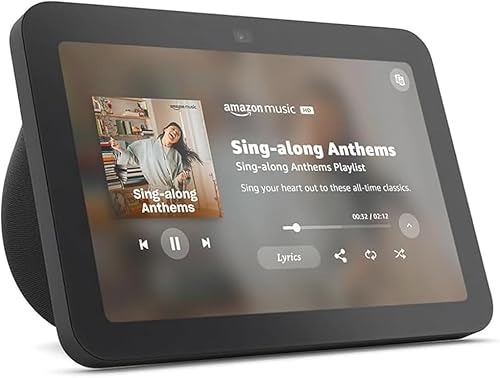
AMAZON
Amazon Echo Show 8, With Spatial Audio, Smart Home Hub, ideal for open living spaces, Designed for Alexa+, Charcoal
The Amazon Echo Show 8 combines an 8-inch HD touchscreen with Alexa+, spatial audio, a built-in smart-home hub, and a 13 MP camera. The article positions it as a versatile choice for households that want smart-home control alongside entertainment and video calling.
Who Should Buy It
Best for Alexa users who want one compact display for smart-home controls, music, video, voice assistance, and communication. It is especially useful when entertainment matters as much as home automation.
Why We Pick It
It earned a spot because it offers more versatility than a dedicated control panel while retaining built-in smart-home hub functionality. The supplied article also identifies its $149.99 price as a reason to consider it.
Features & Benefits
| Feature | Benefit |
|---|---|
| 8-inch HD touchscreen | provides visual control and access to entertainment |
| Built-in smart-home hub | helps connect and manage compatible smart-home devices |
| Spatial audio | creates a more immersive listening experience |
| 13 MP camera | supports video calling and communication |
| Alexa+ | provides voice-based assistance and smart-home control |
Pros & Cons
| Pros | Cons |
|---|---|
| ✓ Built-in smart-home hub | ✕ Smaller display than Nest Hub Max |
| ✓ Versatile entertainment features | ✕ Less specialized for dedicated smart-home control than Echo Hub |
| ✓ 13 MP camera |
The Amazon Echo Show 8 combines smart-home control with an 8-inch HD touchscreen, spatial audio, Alexa+, and a built-in smart-home hub.
The supplied listing also identifies a 13 MP camera. That makes the device more versatile than a dedicated control panel because it can also support video communication and entertainment.
Why the Echo Show 8 Makes Sense for Alexa Homes
The main advantage is versatility. A dedicated Echo Hub focuses more heavily on smart-home control, while the Echo Show 8 adds entertainment and communication features.
The built-in smart-home hub also makes it useful as part of a wider Alexa setup. That combination can reduce the number of separate devices needed in a room.
For a household that wants one screen for music, video, smart-home controls, and voice assistance, the Echo Show 8 is a practical option.
Who Should Choose This Echo Show 8?
Choose this model if the supplied $149.99 price fits your budget and you want an Alexa display with a built-in smart-home hub.
If you specifically want the newer 8.7-inch model with the AZ3 Pro chip and Omnisense technology, the newer Echo Show 8 is the more relevant option.
Apple HomePod mini: Best Smart Home Speaker for Apple Users
Best For: iPhone and Apple users who want Siri-based smart-home control in a compact speaker.

APPLE
Apple - HomePod mini - Black
The Apple HomePod mini is the article's preferred smart-home speaker for users already invested in Apple's ecosystem. Siri, smart-home control, 360-degree sound, and integration with iPhone, iPad, Mac, and Apple TV make it a compact alternative to screen-based hubs.
Who Should Buy It
Best for iPhone and Apple users who want Siri-based smart-home control from a compact speaker. It is also suitable for households that value Apple ecosystem integration and do not need a large touchscreen.
Why We Pick It
It earned a spot because ecosystem compatibility can matter more than display size for Apple households. Its compact design also makes it easy to place in bedrooms, offices, kitchens, and living spaces.
Features & Benefits
| Feature | Benefit |
|---|---|
| Siri | provides hands-free voice control and assistance |
| Apple ecosystem integration | works with iPhone, iPad, Mac, and Apple TV |
| Smart-home control | lets compatible connected devices be controlled through the Apple Home ecosystem |
| 360-degree sound | provides room-filling audio from a compact speaker |
Pros & Cons
| Pros | Cons |
|---|---|
| ✓ Strong Apple ecosystem integration | ✕ No large touchscreen |
| ✓ Compact design | ✕ Less suited to users outside the Apple ecosystem |
| ✓ Siri voice control |
The Apple HomePod mini is the best fit in this group for households already invested in Apple’s ecosystem. Its supplied information highlights Siri, smart-home control, 360-degree sound, and integration with iPhone, iPad, Mac, and Apple TV.
Unlike the Echo Hub, the HomePod mini does not use a large touchscreen as its main interface. Instead, voice control and Apple’s ecosystem provide the primary interaction model.
Why the HomePod mini Is Different
The HomePod mini makes the most sense when the household already uses Apple devices. That ecosystem continuity can matter more than having the largest screen or the longest feature list.
The compact design also makes it easy to place in bedrooms, offices, kitchens, and living spaces. Meanwhile, its speaker function means it remains useful even when you are not controlling smart devices.
Who Should Buy the HomePod mini?
Choose the HomePod mini if Apple Home and Siri are already part of your daily routine. It is less suitable for someone who wants a large visual control dashboard.
If a screen is important, the Echo Hub, Echo Show 8, or Nest Hub Max is a better match.
Newest Amazon Echo Show 8: Best Updated Alexa Smart Display
Best For: Alexa users who want the newer Echo Show 8 design, a larger 8.7-inch display, and updated processing hardware.

AMAZON
Amazon Echo Show 8 (newest model), Vibrant HD 8.7" display with spatial audio, Designed for Alexa+, Graphite
The newest Amazon Echo Show 8 is the updated Alexa smart display in this comparison, with an 8.7-inch display, spatial audio, built-in smart-home hub, AZ3 Pro chip, and Omnisense technology. The article positions it as the better choice for users who specifically want the newer Echo Show hardware.
Who Should Buy It
Best for Alexa households that want an updated Echo Show with a larger viewing area and newer processing hardware. It suits users who interact with the screen frequently for smart-home control and entertainment.
Why We Pick It
It earned a place because its newer hardware separates it from the other Echo Show 8 listing. The article highlights its 8.7-inch display, AZ3 Pro chip, Omnisense technology, and 15% more viewing area versus the 2023 Echo Show 8.
Features & Benefits
| Feature | Benefit |
|---|---|
| 8.7-inch HD display | provides a larger visual area for smart-home controls and media |
| AZ3 Pro chip | provides updated processing hardware for the newer model |
| Built-in smart-home hub | supports connected-home control |
| Spatial audio | creates a more immersive audio experience |
| Omnisense technology | supports the device's newer personalized smart-home capabilities |
| Alexa+ | provides voice-based assistance and control |
Pros & Cons
| Pros | Cons |
|---|---|
| ✓ Larger 8.7-inch display | ✕ Costs more than the older Echo Show 8 listing |
| ✓ Updated hardware | ✕ Still less specialized for smart-home control than Echo Hub |
| ✓ Built-in smart-home hub |
The newest Echo Show 8 is a distinct product in this comparison, even though it shares the Echo Show 8 name with the other listing. The supplied information identifies an 8.7-inch display, AZ3 Pro chip, built-in smart-home hub, Omnisense technology, and spatial audio.
The supplied product description also states that the redesigned display provides 15% more viewing area than the 2023 Echo Show 8.
Why the Newer Echo Show 8 Matters
The main reason to choose this model is its newer hardware and larger viewing area. The difference matters most for users who frequently interact with the display rather than relying only on voice commands.
The built-in smart-home hub also keeps the device relevant beyond entertainment. You can use it as part of an Alexa-based connected home while still having a screen for media and other tasks.
Should You Buy This Instead of the Other Echo Show 8?
Choose the newer model when the updated display, processor, and newer feature set justify the higher supplied price.
The older listing can make more sense when its lower supplied price is the priority and you do not need the newer hardware.
Home Assistant Green: Best for Advanced Smart Home Automation
Best For: Users who want deeper automation, local control, extensive integrations, and more freedom than mainstream smart-home ecosystems typically provide.

NABU CASA
Home Assistant Green | Smart Home hub with Advanced Automation | Official Home Assistant Hardware
Home Assistant Green is the article's strongest choice for advanced automation and customization. It provides dedicated hardware with Home Assistant already installed, making it a more approachable starting point for users who want extensive automation without building the hardware themselves.
Who Should Buy It
Best for advanced users and enthusiasts who want deeper automation, broad integrations, and more control than mainstream smart-home ecosystems typically provide. It can also suit users who want to build a connected home around devices from different brands.
Why We Pick It
It earned its spot because Home Assistant is designed around extensive integrations and automation rather than a single consumer ecosystem. The supplied product information also identifies Green as official Home Assistant hardware with the software preinstalled.
Features & Benefits
| Feature | Benefit |
|---|---|
| Preinstalled Home Assistant | lets users start without installing the operating system themselves |
| Dedicated smart-home hardware | provides a purpose-built platform for home automation |
| Advanced automation | supports more complex routines and integrations |
| Home Assistant platform | provides a flexible environment for connecting and managing compatible devices |
| Official hardware | is built and supported by the Home Assistant ecosystem |
Pros & Cons
| Pros | Cons |
|---|---|
| ✓ Strong automation flexibility | ✕ Steeper learning curve than basic smart displays |
| ✓ Home Assistant comes preinstalled | ✕ Less focused on plug-and-play consumer entertainment |
| ✓ Designed for advanced smart-home control |
Home Assistant Green is the strongest advanced-automation option in this group because it is dedicated hardware built to run Home Assistant.
The supplied product information describes it as official Home Assistant hardware with the software already installed. That plug-and-play approach removes much of the hardware setup normally associated with building a Home Assistant system.
Home Assistant also states that Green supports more than 1,000 built-in integrations. Its platform is designed to bring many devices and services into one interface.
Why Home Assistant Green Stands Out
The major advantage is flexibility. Home Assistant is designed around extensive integrations and automation rather than one manufacturer’s ecosystem.
That makes Home Assistant Green particularly interesting for households with devices from different brands. It can also suit users who want more control over how their automations work.
Home Assistant states that data can remain local. That gives the platform a different privacy and control approach from services that rely more heavily on cloud infrastructure.
Is Home Assistant Green Good for Beginners?
Home Assistant Green is easier to start with than building Home Assistant hardware from scratch. However, its greater flexibility also creates a steeper learning path than a simple voice assistant.
For a beginner who wants quick setup, an Echo Hub or smart display may feel simpler. For someone willing to learn automation, Home Assistant Green offers much more room to grow.
What Is the Difference Between a Smart Home Hub and a Smart Display?
A smart home hub coordinates connected devices, while a smart display adds a screen for visual control, information, communication, and entertainment.
The difference matters because not every smart speaker or display serves the same role. Some products combine display, voice assistant, and hub functions, while others focus primarily on one part of the experience.
Dedicated Smart Home Control
The Echo Hub is the clearest example in this group. Its interface is designed around controlling connected devices and organizing smart-home widgets.
Smart Display With Home Control
The Echo Show 8 and Nest Hub Max combine smart-home control with entertainment, communication, and visual information.
Smart Speaker With Voice Control
The HomePod mini takes a more compact approach. Siri and Apple’s ecosystem provide the primary interaction model.
Automation Hub
Home Assistant Green takes a different route. It provides dedicated hardware for an automation platform rather than focusing on a consumer smart-display experience.
How Do Smart Home Ecosystems and Compatibility Work?
The best smart home system is usually the one that works well with the devices you already own and the devices you plan to buy.
Amazon Alexa, Google Home, Apple Home, and Home Assistant each provide different ways to organize compatible devices. Therefore, compatibility should come before appearance or speaker quality when choosing a central system.
If you are starting from scratch, create a list of your planned devices first. Include lights, plugs, cameras, locks, thermostats, sensors, speakers, and appliances.
Then check which ecosystem supports those products before buying the central hub.
For beginners, our guide to smart home devices for beginners can help narrow down the first devices to add.
Does Matter Make a Smart Home System More Compatible?
Matter can improve interoperability between compatible smart-home devices, but it does not replace your smart-home platform.
Matter is an industry standard designed to help compatible devices from different manufacturers communicate more consistently. It works with familiar networking technologies such as Wi-Fi, Thread, and Ethernet.
However, Matter does not mean that every device will work with every feature on every platform. You should still check the exact device, controller, and feature support before buying.
This is especially important when comparing Alexa, Google Home, Apple Home, and Home Assistant. A device can support Matter while still having platform-specific differences.
What Can a Smart Home Do?
A smart home can automate lighting, security, climate control, entertainment, appliances, and other connected devices.
For example, a simple routine could turn off selected lights, adjust a thermostat, and lock compatible doors when you leave home.
More advanced systems can combine multiple sensors, schedules, presence information, and device states. That is where platforms such as Home Assistant become particularly attractive.
Smart Home Security
Smart cameras, locks, alarms, and sensors can form part of a broader connected-home system. If outdoor security is one of your goals, you can also explore our guide to the best outdoor security cameras for apartments.
Battery-powered cameras can also make installation easier in locations where running power cables is difficult. Our guide to battery-operated outdoor security cameras covers that use case separately.
Smart Lighting
Smart lighting can respond to schedules, voice commands, sensors, and routines. It is also one of the easiest ways to experience home automation because the benefit is immediately visible.
Smart Entertainment
Smart displays and speakers can combine entertainment with household control. That is one reason Echo Show and Nest Hub products can appeal to families that want more than a traditional smart-home hub.
How Do You Build a Smart Home System?
The easiest way to build a smart home system is to start with one ecosystem, add a few useful devices, and expand gradually.
- Choose your ecosystem: Start with Amazon, Google, Apple, or Home Assistant based on your existing devices and goals.
- Choose the central controller: Pick a compatible hub, smart display, speaker, or dedicated automation device.
- Start with useful devices: Smart plugs, lights, sensors, and cameras are common starting points.
- Create simple routines: Automate one repeated task before creating complex scenes.
- Check compatibility: Look for Matter and other supported standards when adding new devices.
- Expand gradually: Add devices only when they solve a real problem.
A gradual approach also reduces compatibility problems. It is easier to troubleshoot five connected devices than a house full of products purchased from unrelated ecosystems.
How Important Is Your Wi-Fi Network?
A reliable home network is important because many smart-home devices depend on wireless connectivity.
Before buying a large number of connected devices, check whether your router provides reliable coverage throughout the home. Network congestion can also become more noticeable as the number of connected devices grows.
If you are considering newer networking technology, our explanation of Wi-Fi 7 versus Wi-Fi 6 can help you understand the differences before upgrading your network.
Should You Choose Local or Cloud-Based Smart Home Control?
Local control is often preferable for users who prioritize privacy, resilience, and advanced automation, while cloud-based ecosystems can be easier for beginners.
Home Assistant Green is particularly relevant here because Home Assistant emphasizes local data handling and local control. That approach can also reduce dependence on an external service for some functions.
Cloud-connected systems still offer major benefits. They can simplify remote access, voice services, device discovery, updates, and integration with popular online services.
Therefore, the best approach depends on how much control you want versus how much simplicity you prefer.
What Should You Consider Before Buying a Smart Home System?
The most important buying factors are ecosystem compatibility, device support, automation capability, interface, network requirements, and long-term flexibility.
1. Ecosystem Compatibility
Choose a system that works with the devices you already use. This reduces the need to replace working hardware.
Apple households should consider Apple Home first. Google users should look closely at Google Home. Alexa users have several Echo-based choices.
2. Device Compatibility
Check every major device category before buying. Cameras, locks, thermostats, lights, sensors, and appliances may not all support the same platforms.
3. Automation Depth
Simple routines are enough for many homes. Advanced users may want conditions, triggers, integrations, and more complex automation logic.
Home Assistant Green is the strongest option here because Home Assistant is designed around extensive integrations and automation.
4. Screen or No Screen
A screen is useful when you want visual controls, camera feeds, media, calendars, or information at a glance.
A speaker such as the HomePod mini can be better when you prefer voice interaction and a smaller footprint.
5. Privacy and Local Control
Privacy-conscious users should understand where their smart-home data is processed and stored. Local-focused platforms can offer more control over that data.
6. Price and Expansion Cost
Do not judge the system by the hub price alone. Consider the cost of compatible lights, sensors, cameras, plugs, locks, and other devices you will add later.
What Is the Best Smart Home System for Beginners?
The Amazon Echo Hub is the strongest beginner-friendly choice when a dedicated smart-home screen is important, while an Echo Show 8 is better if entertainment is also a priority.
The Echo Hub keeps smart-home controls central. Its dashboard approach can make daily device management easier for people who prefer tapping controls instead of opening multiple apps.
However, Apple users may find the HomePod mini easier to adopt because it fits naturally into an existing Apple environment.
Google users should similarly start with Google Home-compatible hardware such as the Nest Hub Max.
What Is the Best Smart Home System for Advanced Automation?
Home Assistant Green is the strongest choice for advanced automation because it provides dedicated hardware for the Home Assistant platform.
The platform is built around extensive integrations and automation. It can also connect devices from different brands and standards.
The trade-off is complexity. Users who want a simple setup may prefer Alexa, Google Home, or Apple Home.
Is Alexa the Best Smart Home System?
Alexa is one of the strongest smart-home ecosystems for users who want broad consumer-device support and several hardware choices.
The Echo Hub focuses on dedicated control. The Echo Show 8 adds entertainment and video features. The newer Echo Show 8 adds updated hardware and a larger display.
However, Alexa is not automatically the best system for every household. Apple users may prefer Apple Home, Google users may prefer Google Home, and advanced automation users may prefer Home Assistant.
Is Google Home the Best Smart Home System?
Google Home is a strong choice for households already using Google services and compatible Nest products.
The Nest Hub Max combines a large display with Google Assistant and smart-home controls. It can also serve entertainment and household-information needs.
Still, the best choice depends on the devices you intend to connect. Ecosystem compatibility matters more than the brand name alone.
Is Apple Home the Best Smart Home System?
Apple Home is a strong option for households that already rely heavily on Apple devices and want Siri-based control.
The HomePod mini provides a compact way to interact with smart-home devices while also functioning as a speaker.
It is not the best choice for someone who wants a large central touchscreen. In that situation, a smart display such as the Echo Hub or Nest Hub Max is a better fit.
What Is the Most Reliable Smart Home System?
The most reliable smart home system is the one with strong compatibility, stable networking, and a controller that matches your devices and automation needs.
Reliability is not determined by the hub alone. A poor Wi-Fi signal, incompatible device, overloaded network, or badly configured automation can cause problems in any ecosystem.
Therefore, choose the system first and then build the network and device ecosystem around it carefully.
Advantages and Disadvantages of Smart Home Systems
Smart home systems can make everyday tasks easier, but they also add complexity and dependence on connected technology.
Advantages of a Smart Home
- Convenience: Control devices from one interface or with voice commands.
- Automation: Let routines handle repeated household tasks.
- Centralized control: Manage multiple compatible devices from one ecosystem.
- Accessibility: Voice and visual controls can make devices easier to operate.
- Customization: Advanced platforms can support complex automation.
Disadvantages of Smart Home Technology
- Compatibility limits: Not every device works with every platform.
- Network dependence: Many devices rely on a stable home network.
- Setup complexity: Advanced systems require more configuration.
- Ongoing costs: Expanding the system requires additional devices.
- Privacy considerations: Cloud-connected services may process household data.
How We Compare These Smart Home Systems
The comparison focuses on the factors that matter most when choosing a central smart-home platform or controller.
- Control method: Voice, touchscreen, or dedicated automation interface.
- Ecosystem: Amazon Alexa, Google Home, Apple Home, or Home Assistant.
- Automation: How well the product fits simple or advanced routines.
- Device compatibility: Support for a broad range of connected devices.
- Ease of setup: How approachable the product is for a new user.
- Expansion: Whether the system can grow as the home becomes more connected.
- Value: What the product offers relative to its supplied price.
This approach avoids treating every product as if it serves exactly the same purpose. A dedicated control panel should be judged differently from a smart speaker or advanced automation hub.
Common Questions About the Best Smart Home System
What is the best smart home system overall?
The Amazon Echo Hub is the strongest overall choice in this selection for dedicated smart-home control, while Home Assistant Green is better for advanced automation.
What is the best smart home system for beginners?
The Echo Hub is a strong beginner choice because its dedicated dashboard focuses on everyday smart-home controls. The Echo Show 8 is better if entertainment also matters.
What is the best DIY smart home system?
Home Assistant Green is the strongest DIY-oriented choice in this selection because it provides dedicated hardware for the flexible Home Assistant platform.
What does a smart home consist of?
A smart home consists of connected devices, a network, and one or more systems that let those devices communicate and automate tasks.
What can a smart home do?
A smart home can automate lighting, security, climate control, entertainment, appliances, and other connected devices.
Do I need a smart home hub?
You do not always need a separate hub, but a central controller can simplify device management and automation.
Can different smart home systems work together?
Yes, compatible systems can work together, especially when devices support standards such as Matter. However, compatibility should always be checked for the exact devices and features.
Does Matter replace Alexa, Google Home, or Apple Home?
No. Matter is a connectivity standard rather than a replacement for a smart-home platform.
Which smart home system is best for Apple users?
The Apple Home ecosystem is the most natural starting point for Apple households, making the HomePod mini a strong choice in this product selection.
Which smart home system is best for Google users?
Google Home is the natural choice for households already invested in Google services and compatible Nest products, making the Nest Hub Max a strong option here.
Which smart home system is best for Alexa users?
Alexa users have several good options. Choose the Echo Hub for dedicated control or an Echo Show 8 when entertainment and communication matter too.
Is Home Assistant Green difficult to use?
Home Assistant Green is easier to start than building Home Assistant hardware from scratch because the software comes installed. However, advanced automation still requires more learning than a basic smart display.
Final Thought
The best smart home system depends on how you want to control your home, which devices you already own, and how much automation you need.
- Best Dedicated Smart Home Control: Amazon Echo Hub | View Now at Amazon
- Best Advanced Automation: Home Assistant Green | View Now at Amazon
- Best for Apple Users: Apple HomePod mini | View Now at Amazon
- Best for Google Home: Google Nest Hub Max | View Now at Amazon
- Best Alexa Smart Display: Amazon Echo Show 8 | View Now at Amazon
- Best Updated Echo Show: Amazon Echo Show 8 Newest Model | View Now at Amazon
Choose the ecosystem that matches your devices today, then build your smart home gradually around the features you will actually use.
Learn more about Matter and smart-home interoperability from the Connectivity Standards Alliance.