
Smart devices for home can make daily routines easier, improve convenience, and add useful layers of security. The best choices depend on what you want to control, automate, or monitor.
For most homes, the best approach is to choose a compatible ecosystem first. Amazon Alexa, Google Home, Apple Home, and Matter-compatible devices can all support a connected home.
You also do not need dozens of gadgets. Start with devices that solve real problems, then expand the system as your needs change.
Quick Answer: What Are the Best Smart Devices for Home?
The best smart devices for home include smart speakers, smart lights, smart plugs, video doorbells, smart displays, thermostats, and smart locks.
Related Posts
 | Best Smart Home Devices for Beginners: 8 Top Picks |
 | Best Ergonomic Office Chair: 7 Top Picks for 2026 |
 | Best Home Office Desk for Multiple Monitors (2026) |
For most beginners, a smart speaker, smart plug, or smart light is a practical starting point. These devices can add voice control and automation without major changes to the home.
Security devices, thermostats, displays, and smart locks offer more advanced features. However, they require closer attention to compatibility, installation, privacy, and security.
Smart-home tip: Check compatibility before buying. A device that works with your preferred ecosystem is often more useful than one with extra features but limited integration.
Smart Devices for Home Compared
| Product | Category | Best For | Amazon |
|---|---|---|---|
| Amazon Echo Studio | Smart speaker | Alexa users who want stronger sound | View on Amazon |
| Google Nest Audio 3-Pack Smart Speakers | Smart speaker | Google Home users who want multiple speakers | View on Amazon |
| Philips Hue Essential Smart LED | Smart lighting | Flexible everyday lighting | View on Amazon |
| Govee Curtain Lights | Smart lighting | Decorative lighting effects | View on Amazon |
| Eve Energy Smart Plug | Smart plug | Apple Home users and energy monitoring | View on Amazon |
| TP-Link Kasa KP303 Smart Power Strip | Smart power strip | Controlling several electronics | View on Amazon |
| Arlo Video Doorbell | Video doorbell | Front-door monitoring | View on Amazon |
| Ring Battery Doorbell Plus | Video doorbell | Battery-powered door monitoring | View on Amazon |
| Amazon Echo Show 15 Bundle | Smart display | Family organization and Alexa control | View on Amazon |
| Google Pixel Tablet | Tablet and smart-home control | Google Home control and entertainment | View on Amazon |
| Amazon Echo Show 21 | Large smart display | Shared smart-home control and entertainment | View on Amazon |
| Google Nest Learning Thermostat 4th Gen | Smart thermostat | Google Home users | View on Amazon |
| ecobee Smart Thermostat Essential | Smart thermostat | Simple programmable temperature control | View on Amazon |
| Google Nest × Yale Lock with Nest Connect | Smart lock | Google-connected entry control | View on Amazon |
| SwitchBot Smart Lock | Smart lock | Retrofitting compatible existing locks | View on Amazon |
| Yale August Wi-Fi Smart Lock with Keypad | Smart lock | Connected entry and keypad access | View on Amazon |
Best Smart Devices for Home by Category
Amazon Echo Studio
Best Overall Smart Speaker
Best For: Alexa users who want a smart speaker with powerful room-filling sound.

AMAZON
Amazon Echo Studio (1st Generation) Smart Speaker
The Echo Studio is a powerhouse smart speaker designed to elevate your smart home setup with high-fidelity sound. By combining premium spatial audio with a built-in smart home hub, it serves as the ultimate central command for both your entertainment and your connected devices.
Who Should Buy It
Homeowners who want to upgrade their smart home with a premium audio system that also doubles as a central hub to control Zigbee and Matter-compatible smart devices.
Why We Pick It
We chose this for our smart home roundup because it seamlessly bridges the gap between a high-end entertainment speaker and a functional smart home controller, eliminating the need for a separate hub.
Features & Benefits
| Feature | Benefit |
|---|---|
| Built-In Smart Hub | Allows you to easily connect and voice-control Zigbee and Matter-compatible smart devices directly through Alexa. |
| Spatial Audio & Dolby Atmos | Fills your room with an immersive, multi-dimensional sound stage featuring powerful bass and crisp highs. |
| Automatic Room Tuning | Senses the acoustics of your specific space to automatically optimize and fine-tune playback. |
Pros & Cons
| Pros | Cons |
|---|---|
| ✓ Built-in Zigbee and Matter smart hub | ✕ Large physical footprint compared to standard Echo models |
| ✓ Immersive 5-speaker Dolby Atmos sound | |
| ✓ Adapts playback automatically to room acoustics |
The Echo Studio is a strong choice for an Alexa-centered smart home. It combines voice control with a larger audio experience than compact smart speakers.
It can also act as a convenient voice-control point for compatible lights, plugs, thermostats, cameras, and other connected devices.
Google Nest Audio 3-Pack Smart Speakers
Best Multi-Room Smart Speaker Setup
Best For: Google Home users who want smart speakers across several rooms.

Google Nest Audio Smart Speakers (3-Pack)
This three-pack of Google Nest Audio speakers is an excellent foundation for any smart home, offering coordinated, room-filling sound across your entire living space. With Google Assistant built right in, it serves as both a high-quality multi-room audio system and a centralized voice controller for your connected smart devices.
Who Should Buy It
Homeowners and apartment dwellers looking to set up a cohesive, multi-room smart audio system that doubles as a hands-free hub for their smart home automation.
Why We Pick It
We chose this bundle because it delivers an instant, comprehensive smart audio upgrade for up to three rooms, seamlessly integrating with thousands of smart home devices right out of the box.
Features & Benefits
| Feature | Benefit |
|---|---|
| Whole-Home Smart Audio | Sync all three speakers to play seamless, synchronized music throughout your entire home or keep them independent in different rooms. |
| Hands-Free Voice Assistant | Easily control your smart lights, thermostats, and locks using simple voice commands via Google Assistant. |
| Stereo Pairing & Grouping | Pair two of the speakers together in a single room to create an immersive, dynamic left-and-right stereo soundstage. |
Pros & Cons
| Pros | Cons |
|---|---|
| ✓ Convenient three-pack for multi-room coverage | ✕ Requires a consistent Wi-Fi connection for full smart functionality |
| ✓ Integrates with thousands of smart home devices | |
| ✓ Supports both Wi-Fi and Bluetooth streaming |
A multi-speaker setup can make voice control more convenient throughout the home. The Google Nest Audio 3-Pack is therefore useful for households building around Google Home.
Multiple speakers can also provide a more consistent way to access compatible smart-home controls from different rooms.
Philips Hue Essential Smart LED
Best Smart Lighting
Best For: Users who want adjustable smart lighting for everyday rooms.

PHILIPS HUE
Philips Hue Essential Smart LED A19 Bulb (4-Pack)
Every modern smart home setup deserves reliable, vibrant smart lighting to set the perfect mood. This Philips Hue 4-pack integrates seamlessly with major smart home assistants, giving you instant remote and voice control over millions of colors.
Who Should Buy It
Homeowners looking to easily upgrade multiple rooms with highly customizable, color-changing smart bulbs that work with Alexa, Google Assistant, or Apple Home.
Why We Pick It
We chose this pack because Philips Hue is the gold standard in smart lighting, offering unmatched color accuracy, smooth dimming down to 2%, and effortless integration into any smart home ecosystem.
Features & Benefits
| Feature | Benefit |
|---|---|
| App & Voice Control | Manage your lights remotely or use voice commands through Alexa, Google Assistant, or Apple Home without leaving your couch. |
| Millions of Colors | Instantly transform your living space with preset scenes and endless color options to match any mood or activity. |
| Expandable Setup | Easily scale your system by adding a Hue Bridge to unlock advanced features like content syncing and enhanced home security. |
Pros & Cons
| Pros | Cons |
|---|---|
| ✓ Works with Alexa, Google Assistant, and Apple Home | ✕ Hue Bridge required to unlock full advanced feature set |
| ✓ Smooth dimming down to 2% brightness | |
| ✓ Vibrant color library and preset scenes |
Philips Hue Essential is a practical way to introduce smart lighting. Connected bulbs can simplify routines through schedules, scenes, and app-based control.
They can also change the atmosphere of bedrooms, living rooms, offices, and entertainment spaces.
Govee Curtain Lights
Best Decorative Smart Lights
Best For: Bedrooms, entertainment areas, and decorative lighting installations.

GOVEE
Govee Smart Curtain Lights 2
Elevate your smart home ecosystem with these high-density LED curtain lights, designed to bring customizable, animated visuals to your indoor decor. Integrating seamlessly with top smart platforms, they turn any blank wall into a dynamic canvas of light, color, and pattern.
Who Should Buy It
Homeowners looking to integrate highly customizable, voice-controlled ambient lighting into their modern smart home setup.
Why We Pick It
We chose this product for its robust smart integration, including Matter, Alexa, and Google Assistant, coupled with cutting-edge AI features that make smart home lighting truly interactive.
Features & Benefits
| Feature | Benefit |
|---|---|
| 1040 LED Beads | Provides a high-density 40x26 pixel arrangement for incredibly smooth GIF displays and rich, detailed visual patterns on your wall. |
| Smart Home Integration | Connects effortlessly via Matter, Govee Home App, Alexa, or Google Assistant for hands-free voice and automation control. |
| AI Light Show Bot | Generates custom lighting effects instantly from text prompts or image uploads, tailoring the atmosphere to any mood. |
Pros & Cons
| Pros | Cons |
|---|---|
| ✓ Matter and voice assistant support | ✕ Cannot be split or spliced individually |
| ✓ Over 200 preset scene modes | |
| ✓ DIY canvas for custom animations |
Govee Curtain Lights are aimed at users who want lighting to become part of a room’s visual design. The curtain format can cover a larger wall area than a standard bulb.
As a result, they are better suited to decorative effects than basic room illumination.
Eve Energy Smart Plug
Best Smart Plug for Apple Home
Best For: Apple Home users who want connected control and energy monitoring.

EVE
Eve Energy Smart Plug & Power Meter
The Eve Energy smart plug is a powerful addition to any modern smart home, offering seamless control over your lamps and appliances while monitoring their energy usage. Designed to integrate flawlessly into your existing Apple ecosystem, it leverages Thread technology for faster, more reliable connectivity without cluttering your home network.
Who Should Buy It
Apple HomeKit users who want to automate their household appliances and track their real-time electricity consumption and projected costs.
Why We Pick It
We chose this smart plug for its top-tier local intelligence and privacy protection, requiring no external cloud registration while offering future-proof Thread networking.
Features & Benefits
| Feature | Benefit |
|---|---|
| Energy Tracking | Monitor your power consumption and view projected electricity costs based on your specific rate. |
| Thread Support | Enjoys faster response times and a more robust smart home mesh network when paired with a compatible border router. |
| 100% Privacy-First | No cloud dependency, no registration, and no tracking ensures your smart home data remains entirely private. |
Pros & Cons
| Pros | Cons |
|---|---|
| ✓ No bridge or gateway required | ✕ Requires iOS device and HomeKit setup |
| ✓ Autonomous on-device scheduling | ✕ Thread functionality requires a compatible border router |
| ✓ Excellent Thread and Bluetooth integration |
Eve Energy can turn compatible appliances into part of a connected routine. A smart plug can also automate ordinary lamps and other suitable devices without replacing the appliance itself.
This makes smart plugs one of the simplest ways to add automation to an existing home.
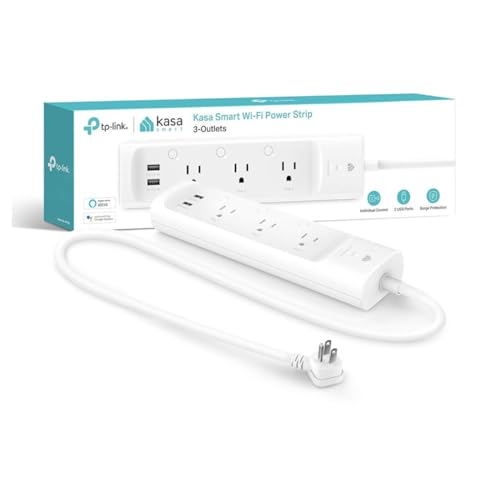
TP-Link Kasa KP303 Smart Power Strip
Best Smart Power Strip
Best For: Desks, entertainment centers, and areas with several electronics.
TP-LINK
TP-Link Kasa Smart Wi-Fi Power Strip (KP303)
This smart power strip is an excellent addition to any modern smart home, allowing you to convert standard wall outlets into individually controllable smart plugs. With integration for major voice assistants and built-in surge protection, it simplifies power management for your everyday electronics.
Who Should Buy It
Homeowners looking to integrate multiple traditional appliances into their smart home ecosystem without buying dozens of individual smart plugs.
Why We Pick It
We chose this power strip because it offers the perfect balance of individual outlet control, voice assistant compatibility, and essential surge protection to keep your smart home gear safe.
Features & Benefits
| Feature | Benefit |
|---|---|
| 3 Independent Outlets | Allows you to schedule and control three different appliances separately from your smartphone or voice assistant. |
| Surge Protection | Shields your sensitive smart home electronics and appliances from sudden voltage spikes and power surges. |
| Kasa App Integration | Provides remote access to monitor and schedule your connected devices from anywhere without requiring a bulky hub. |
Pros & Cons
| Pros | Cons |
|---|---|
| ✓ Independent control of 3 AC outlets | ✕ The 2 USB ports are always-on and not individually controllable |
| ✓ No hub required for setup | |
| ✓ Works with Alexa and Google Assistant |
The Kasa KP303 is useful when several electronics need smart control in one location. A power strip can create a cleaner setup than using multiple individual smart plugs.
It can be especially useful around desks, entertainment centers, and charging stations.
Arlo Video Doorbell
Best Smart Video Doorbell
Best For: Monitoring visitors and receiving doorbell or motion alerts.

ARLO
Arlo Video Doorbell 2K (2nd Gen)
As you build out your smart home, securing the front door is the logical first step. The Arlo Video Doorbell 2K (2nd Gen) integrates seamlessly into your connected ecosystem, offering crystal-clear surveillance and flexible installation options to suit any entryway.
Who Should Buy It
Homeowners and renters looking for an easy-to-install smart doorbell that works seamlessly with Alexa, Google Home, and Apple Home.
Why We Pick It
We chose this doorbell for its exceptional 2K head-to-toe video coverage and its versatile power options, making it one of the most adaptable smart entry devices on the market.
Features & Benefits
| Feature | Benefit |
|---|---|
| Flexible Power | Choose between a wire-free rechargeable setup or hardwire it to existing lines for continuous power. |
| Head-to-Toe 2K View | Allows you to see visitors fully and check on packages left directly on the ground. |
| Multi-Platform Integration | Works with Alexa, Apple Home, Google Home, and SmartThings to easily trigger automated routines. |
Pros & Cons
| Pros | Cons |
|---|---|
| ✓ Sharp 2K video clarity | ✕ Advanced AI features require a paid subscription |
| ✓ Flexible wired or wireless installation | ✕ Cloud video history is not free |
| ✓ Broad smart home compatibility |
A smart video doorbell adds visibility around the front entrance. It can alert you when someone approaches or interacts with the doorbell.
For a connected home, a video doorbell can also complement compatible smart displays and voice assistants.
Ring Battery Doorbell Plus
Best Battery-Powered Doorbell
Best For: Homes that prefer a flexible battery-powered doorbell installation.

RING
Ring Battery Doorbell 2K Plus (newest model), Retinal 2K with wide-angle video, up to 6x Enhanced Zoom, Night Vision, and Quick Release Battery Pack, Nickel Silver
The Ring Battery Doorbell 2K Plus is designed for households that prefer a flexible battery-powered video doorbell setup. The newer model provides 2K video, wide-angle viewing, night vision, enhanced zoom, and a quick-release battery pack.
Who Should Buy It
Best for homes where flexible installation matters or running new doorbell wiring is inconvenient. It also suits users who want detailed video and battery-powered operation.
Why We Pick It
It earned the Best Battery-Powered Doorbell position because its battery design simplifies installation in suitable homes. The 2K video and quick-release battery add useful convenience for front-door monitoring.
Features & Benefits
| Feature | Benefit |
|---|---|
| 2K video | provides detailed front-door footage |
| Quick-release battery | makes battery changes easier |
| Night vision | helps monitor the entrance in darker conditions |
Pros & Cons
| Pros | Cons |
|---|---|
| ✓ Battery-powered installation | ✕ Battery requires regular charging |
| ✓ 2K video | ✕ Wireless security devices need ongoing maintenance |
| ✓ Quick-release battery pack |
The Ring Battery Doorbell Plus suits households that prefer a battery-powered setup. This can simplify installation when running new doorbell wiring is inconvenient.
However, battery-powered security devices need regular attention to battery status and charging.
Amazon Echo Show 15 Bundle
Best Smart Display for Families
Best For: Shared calendars, household organization, entertainment, and Alexa control.

AMAZON
Echo Show 15 Bundle: Includes All-New Echo Show 15 & Made for Amazon Frame | Light Brown
The Echo Show 15 provides a large visual interface for shared household information and Alexa control. The bundle includes the Echo Show 15 and a Made for Amazon Frame, making it suitable for a shared household space.
Who Should Buy It
Best for families who want shared calendars, lists, entertainment, and compatible smart-home controls on a larger display. It also suits Alexa-centered homes that want a visual control point.
Why We Pick It
It earned the Best Smart Display for Families position because a large display can make household information easier to access. The supplied bundle also adds the Made for Amazon Frame.
Features & Benefits
| Feature | Benefit |
|---|---|
| Large smart display | provides a visual interface for household information |
| Alexa control | enables voice interaction with compatible devices |
| Made for Amazon Frame | provides the supplied display framing accessory |
Pros & Cons
| Pros | Cons |
|---|---|
| ✓ Large shared interface | ✕ Larger than compact smart displays |
| ✓ Alexa smart-home control | ✕ Bundle contents should be checked before purchase |
| ✓ Includes frame |
The Echo Show 15 provides a large visual interface for a shared household space. A smart display can make calendars, lists, entertainment, and compatible smart-home controls easier to access.
Because this is a bundle, check the current package contents before purchasing.
Google Pixel Tablet
Best Google Home Tablet
Best For: Google Home users who also want a tablet for everyday entertainment.

Google Pixel Tablet - Android Tablet with 11" Screen and Extra Long Battery Life - 8GB RAM - 128GB Storage - Sage Green
The Google Pixel Tablet combines everyday Android tablet functionality with a useful option for interacting with a connected home. It makes the most sense for households already using Google services and compatible Google Home products.
Who Should Buy It
Best for Google Home users who also want a tablet for entertainment and everyday tasks. It suits users who prefer a larger screen for interacting with compatible Google services.
Why We Pick It
It earned the Best Google Home Tablet position because it combines tablet use with a place in a Google-centered smart-home setup. The 11-inch screen also provides a larger interface than a typical phone.
Features & Benefits
| Feature | Benefit |
|---|---|
| 11-inch screen | provides a larger display for entertainment and smart-home interaction |
| 8GB RAM | supports everyday multitasking |
| 128GB storage | provides space for apps and personal content |
Pros & Cons
| Pros | Cons |
|---|---|
| ✓ Combines tablet and smart-home use | ✕ Amazon listing shown as currently unavailable |
| ✓ 11-inch display | ✕ More general-purpose than a dedicated smart display |
| ✓ Google Home ecosystem fit |
The Google Pixel Tablet combines everyday tablet functionality with a useful option for interacting with a connected home.
It makes the most sense for households already using Google services and compatible Google Home products.
Amazon Echo Show 21
Best Large Smart Display
Best For: Shared spaces that benefit from a large screen for smart-home control and entertainment.

AMAZON
Amazon Echo Show 21 (newest model), Full HD 21" kitchen hub for home organization, with built-in Fire TV, Designed for Alexa+
The Echo Show 21 is a large smart display designed for shared spaces and household organization. Its 21-inch Full HD screen can make information, entertainment, video calls, and compatible smart-home controls easier to see.
Who Should Buy It
Best for kitchens, family rooms, and other central areas where multiple people can benefit from a large screen. It suits Alexa users who want a shared visual smart-home hub.
Why We Pick It
It earned the Best Large Smart Display position because its large screen is useful for shared household activities. Built-in Fire TV also expands its role beyond basic smart-home control.
Features & Benefits
| Feature | Benefit |
|---|---|
| 21-inch Full HD display | makes shared information and controls easier to see |
| Built-in Fire TV | adds entertainment functionality |
| Alexa integration | supports voice control and compatible smart-home functions |
Pros & Cons
| Pros | Cons |
|---|---|
| ✓ Very large 21-inch display | ✕ Requires substantial wall or counter space |
| ✓ Useful for shared spaces | ✕ Larger than necessary for small rooms |
| ✓ Built-in Fire TV |
The Echo Show 21 is designed for users who want a larger visual interface in a shared space. A large display can make household information, entertainment, video calls, and compatible smart-home controls easier to see.
It can be particularly useful in kitchens, family rooms, and other central areas.
Google Nest Learning Thermostat 4th Gen
Best Smart Thermostat for Google Home
Best For: Google Home households that want connected temperature management.

Google Nest Learning Thermostat (4th gen) + Nest Temperature Sensor (2nd gen) - Obsidian
The Google Nest Learning Thermostat 4th Gen is designed for connected temperature management and can reduce the need for constant manual adjustments. This package also includes a second-generation Nest Temperature Sensor.
Who Should Buy It
Best for Google Home households that want connected temperature management. It suits users who already use compatible Google smart-home products and want thermostat control within that ecosystem.
Why We Pick It
It earned the Best Smart Thermostat for Google Home position because it fits naturally into a Google-centered connected home. The included temperature sensor can also support temperature monitoring in another location.
Features & Benefits
| Feature | Benefit |
|---|---|
| Learning thermostat | helps automate temperature management |
| Nest Temperature Sensor | provides temperature information from another location |
| Google Home integration | connects thermostat control with a compatible smart-home ecosystem |
Pros & Cons
| Pros | Cons |
|---|---|
| ✓ Google Home integration | ✕ HVAC compatibility must be checked |
| ✓ Includes temperature sensor | ✕ Installation requirements vary by home |
| ✓ Connected temperature management |
A smart thermostat can reduce the need for constant manual temperature adjustments. It can also become part of broader connected-home routines.
The Google Nest Learning Thermostat 4th Gen is a natural option for households already using compatible Google Home products.
ecobee Smart Thermostat Essential
Best Simple Smart Thermostat
Best For: Homeowners who want programmable smart temperature control.

ECOBEE
ecobee Smart Thermostat Essential - WiFi Thermostat, Energy Star Certified
The ecobee Smart Thermostat Essential is designed for homeowners who want connected temperature management without choosing a more feature-heavy thermostat. It provides programmable smart temperature control and works with compatible voice assistants.
Who Should Buy It
Best for homeowners who want straightforward smart temperature control and programmable routines. It is especially suitable for users who want a simpler alternative to more advanced thermostat models.
Why We Pick It
It earned the Best Simple Smart Thermostat position because it focuses on connected temperature management without unnecessary complexity. The Energy Star certification is also relevant for buyers considering energy-conscious home equipment.
Features & Benefits
| Feature | Benefit |
|---|---|
| Wi-Fi connectivity | enables connected thermostat management |
| Programmable control | helps automate temperature routines |
| Energy Star certified | identifies the thermostat as meeting applicable energy-efficiency criteria |
Pros & Cons
| Pros | Cons |
|---|---|
| ✓ Simple smart temperature control | ✕ HVAC compatibility must be checked |
| ✓ Wi-Fi connectivity | ✕ Installation requirements vary by system |
| ✓ Energy Star certified |
The ecobee Smart Thermostat Essential is designed for users who want connected temperature management without choosing a more feature-heavy thermostat.
Before buying any smart thermostat, check HVAC compatibility and installation requirements. A thermostat must work with the home’s existing heating and cooling system.
Google Nest × Yale Lock with Nest Connect
Best Google-Connected Smart Lock
Best For: Homes already invested in compatible Google Nest products.

Google Nest x Yale Lock - Tamper-Proof Smart Lock for Keyless Entry - Keypad Deadbolt Lock for Front Door - Satin Nickel
The Google Nest x Yale Lock adds connected entry control through a keyless keypad deadbolt design. It is intended for homes already invested in compatible Google Nest products.
Who Should Buy It
Best for Google-centered smart homes that want keyless front-door access. It suits users who prefer keypad entry instead of relying solely on a traditional key.
Why We Pick It
It earned the Best Google-Connected Smart Lock position because it combines keyless entry with a Google Nest-centered setup. Its keypad design also provides a practical way to enter without a physical key.
Features & Benefits
| Feature | Benefit |
|---|---|
| Keypad entry | allows keyless access using a code |
| Tamper-proof design | adds a security-focused lock design |
| Google Nest integration | fits compatible Nest smart-home setups |
Pros & Cons
| Pros | Cons |
|---|---|
| ✓ Keyless keypad access | ✕ Best suited to compatible Nest setups |
| ✓ Google Nest ecosystem fit | ✕ Existing door compatibility must be checked |
| ✓ Satin Nickel finish |
A smart lock can make connected entry more convenient. It can reduce reliance on traditional key-based access while adding connected control.
The Nest × Yale Lock is most suitable when the home’s existing smart-home setup supports the required Nest features.
SwitchBot Smart Lock
Best Retrofit Smart Lock
Best For: Users who want to add smart functionality to a compatible existing lock.

SWITCHBOT
SwitchBot Lock Vision Pro Smart Lock, 3D Face Recognition + Palm Vein + Fingerprint, Keyless Entry Deadbolt for Front Door, 12-Month Battery, WiFi No Hub, Auto-Lock, Matter, Apple Home, Alexa, Google
The SwitchBot Lock Vision Pro is a retrofit-oriented smart lock with multiple biometric entry options and connected-home support. The listing shown in the supplied Amazon screenshot includes 3D face recognition, palm vein recognition, fingerprint access, Wi-Fi, Matter, Apple Home, Alexa, and Google support.
Who Should Buy It
Best for users who want advanced keyless entry while upgrading a compatible existing deadbolt. It also suits households that want broad smart-home platform support and multiple biometric access methods.
Why We Pick It
It earned the Best Retrofit Smart Lock position because it is designed around adding smart functionality to an existing compatible lock. Its biometric options and no-hub Wi-Fi connectivity provide additional convenience.
Features & Benefits
| Feature | Benefit |
|---|---|
| 3D face recognition | enables biometric entry using facial recognition |
| Fingerprint and palm vein access | provides alternative keyless entry methods |
| Wi-Fi with no hub | connects the lock directly to a compatible network without requiring a separate hub |
Pros & Cons
| Pros | Cons |
|---|---|
| ✓ Multiple biometric entry options | ✕ Existing deadbolt compatibility must be verified |
| ✓ Wi-Fi without a hub | ✕ Advanced features may add setup complexity |
| ✓ Matter, Apple Home, Alexa, and Google support |
A retrofit smart lock can be useful when you want connected entry without replacing every part of the existing door hardware.
Always verify compatibility with the current deadbolt before buying. Door hardware varies, so compatibility should come before convenience.
Yale August Wi-Fi Smart Lock with Keypad
Best Smart Lock with Keypad Access
Best For: Homes that want connected entry with keypad convenience.

YALE
Yale August Wi-Fi Smart Lock with Keypad Touch in Black
The Yale August Wi-Fi Smart Lock with Keypad Touch adds connected entry with a touchscreen keypad and fingerprint scanner. The supplied Amazon screenshot identifies the model as AUG-SL05-K03-G01 and shows a black finish.
Who Should Buy It
Best for users who want connected entry with keypad and biometric access. It suits homeowners looking for a smart-lock setup that combines app-based control with physical keypad-style entry.
Why We Pick It
The product belongs in the smart-lock category because it adds connected access without relying solely on a traditional key. Its touchscreen keypad and fingerprint scanner provide additional entry options.
Features & Benefits
| Feature | Benefit |
|---|---|
| Touchscreen keypad | provides keyless entry through the keypad |
| Fingerprint scanner | offers biometric entry |
| Wi-Fi smart lock | enables connected access and remote smart-lock functions |
Pros & Cons
| Pros | Cons |
|---|---|
| ✓ Touchscreen keypad | ✕ Compatibility with existing door hardware must be checked |
| ✓ Fingerprint scanner | ✕ Requires battery and connectivity management |
| ✓ Connected Wi-Fi access |
The Yale August Wi-Fi Smart Lock with Keypad combines connected door access with keypad entry. This can provide another convenient way to manage access to the home.
Before installation, check compatibility with the existing door hardware and confirm that the desired smart-home platform supports the required features.
How to Choose the Best Smart Devices for Home
The best smart-home setup starts with compatibility rather than the number of gadgets. Choose products that work with the platform you already use.
Choose Your Smart-Home Ecosystem
Amazon Alexa, Google Home, Apple Home, and Matter can all play different roles in a connected home.
Therefore, decide which ecosystem fits your needs before buying several devices. This can reduce compatibility problems later.
If cross-platform compatibility matters, check whether each product supports Matter and which Matter device types it supports.
Check How Each Device Connects
Smart devices can use Wi-Fi, Bluetooth, Thread, Zigbee, or other connection technologies.
Some products connect directly to your router. Others may require a compatible hub or bridge.
Always check the complete setup requirements before buying. An inexpensive device may need additional hardware to work as expected.
Decide What You Want to Automate
Smart devices are most useful when they solve repeated tasks.
- Use smart plugs for compatible lamps and appliances.
- Use smart lights for schedules and lighting scenes.
- Use smart speakers for hands-free commands.
- Use smart displays for visual controls and household information.
- Use video doorbells for front-door monitoring.
- Use thermostats for automated temperature management.
- Use smart locks for connected entry.
Check HVAC Compatibility Before Buying a Thermostat
Smart thermostats require more research than smart bulbs or plugs. Compatibility with the home’s heating and cooling system is essential.
Check wiring requirements, HVAC compatibility, and installation needs before ordering. Professional installation may also be worthwhile for complex systems.
Consider Privacy and Security
Smart-home devices can collect information about household activity and device usage. Therefore, review privacy settings before connecting sensitive devices.
For cameras and doorbells, use strong account credentials and enable available security features.
For smart locks, keep a practical backup entry method when appropriate. Smart convenience should not eliminate a reliable fallback.
Start Small and Expand
You do not need to automate the entire house at once. Start with one category that solves an obvious everyday problem.
A smart speaker and a few smart plugs can create a useful foundation. Later, you can add lighting, security, thermostats, displays, and smart locks.
Best approach: Build around daily routines. A smaller system that works reliably is usually better than a large collection of disconnected gadgets.
Do Smart Devices for Home Need a Hub?
Not always. Many Wi-Fi smart devices connect directly to your home network and work through the manufacturer’s app.
However, devices using technologies such as Thread or Zigbee may require a compatible hub, border router, bridge, or controller.
Always check the manufacturer’s requirements before buying. This matters even more when combining products from different brands.
What Should You Buy First for a Smart Home?
For most beginners, smart plugs or smart lights are easy places to start. They add automation without requiring major changes to the home.
A smart speaker can come next because it provides voice control for compatible devices.
After that, add security devices, thermostats, displays, or smart locks based on your actual needs.
- Start with smart plugs or lights.
- Add a smart speaker or display.
- Choose compatible security devices.
- Add a thermostat if temperature automation matters.
- Add a smart lock when connected entry is useful.
Are Smart Devices for Home Worth It?
Smart-home devices are worth buying when they make repeated tasks easier or provide useful information.
They offer less value when an app simply replaces a physical switch without adding meaningful convenience.
Smart plugs, lights, speakers, doorbells, thermostats, displays, and locks can all provide practical benefits. The key is choosing products that fit your routines and existing ecosystem.
Which Smart Device Is Best for Your Home?
The best choice depends on what you want your connected home to accomplish.
- For voice control: Consider the Amazon Echo Studio or Google Nest Audio 3-Pack.
- For everyday lighting: Consider Philips Hue Essential smart lighting.
- For decorative lighting: Consider Govee Curtain Lights.
- For simple automation: Start with a smart plug such as Eve Energy.
- For several electronics: Consider the TP-Link Kasa KP303.
- For family organization: Consider the Amazon Echo Show 15 Bundle.
- For a large shared display: Consider the Amazon Echo Show 21.
- For temperature control: Compare Google Nest and ecobee smart thermostats.
- For front-door monitoring: Consider a compatible Arlo or Ring video doorbell.
- For connected entry: Compare the Google Nest × Yale, SwitchBot, and Yale August options.
Final Thought
The best smart devices for home are not necessarily the most advanced products. The right choices are the devices that work together and solve problems you face every day.
- Best Overall Smart Speaker: Amazon Echo Studio | View Now at Amazon
- Best Multi-Room Smart Speaker: Google Nest Audio 3-Pack Smart Speakers | View Now at Amazon
- Best Smart Lighting: Philips Hue Essential Smart LED | View Now at Amazon
- Best Decorative Lighting: Govee Curtain Lights | View Now at Amazon
- Best Smart Plug: Eve Energy Smart Plug | View Now at Amazon
- Best Smart Power Strip: TP-Link Kasa KP303 | View Now at Amazon
- Best Smart Thermostat: ecobee Smart Thermostat Essential | View Now at Amazon
- Best Google-Connected Smart Lock: Google Nest × Yale Lock with Nest Connect | View Now at Amazon
- Best Retrofit Smart Lock: SwitchBot Smart Lock | View Now at Amazon
- Best Smart Lock with Keypad: Yale August Wi-Fi Smart Lock with Keypad | View Now at Amazon
Start with the category that solves your biggest everyday problem, then expand your smart home around a compatible ecosystem.