
Building a smart home does not mean buying a house full of complicated gadgets. The best smart home devices for beginners are the ones that solve an everyday problem, are easy to set up, and work well with the smart-home ecosystem you already use. For most first-time users, a smart speaker, smart plug, or smart light is the easiest place to start.
In this guide, we compare beginner-friendly options across smart speakers, smart displays, lighting, plugs, thermostats, security cameras, smart locks, and water-leak protection. The goal is not to convince you to buy every device, but to help you choose the few that make the most sense for your home.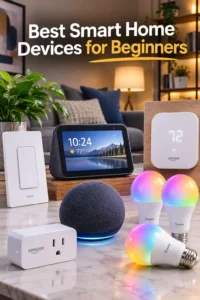
Best Smart Home Devices for Beginners: Quick Comparison
| Product | Image | Amazon | Best For | Key Advantage | Price |
|---|---|---|---|---|---|
| Amazon Echo Dot (newest model) |  🔍 Click image to enlarge | View Now at Amazon | Best Overall | Simple Alexa-based voice control | $49.99 |
| Amazon Smart Plug |  🔍 Click image to enlarge | View Now at Amazon | Best for Beginners | Simple way to automate ordinary appliances | $24.99 |
| Govee Smart Light Bulbs |  🔍 Click image to enlarge | View Now at Amazon | Best Smart Lighting | Color-changing smart lighting | Limited time deal -28% $28.99$39.99 |
| Amazon Echo Show 5 |  🔍 Click image to enlarge | View Now at Amazon | Best Smart Display | Touchscreen plus Alexa control | $89.99 |
| Ring Floodlight Cam Wired Plus |  🔍 Click image to enlarge | View Now at Amazon | Best for Outdoor Security | Outdoor camera with motion-triggered lighting | $179.99 |
| Philips Wi-Fi Smart Deadbolt Lock |  🔍 Click image to enlarge | View Now at Amazon | Best Smart Lock | Multiple ways to unlock | -23% $84.99$109.99 |
| YoLink Water Leak Starter Kit |  🔍 Click image to enlarge | View Now at Amazon | Best for Water Leak Protection | Long-range leak detection and alerts | Limited time deal -21% $54.98$69.99 |
| Amazon Smart Thermostat |  🔍 Click image to enlarge | View Now at Amazon | Best Smart Thermostat | Alexa-based temperature control | $79.99 |
Disclosure: Some links on this page are affiliate links. If you purchase through an affiliate link, we may earn a commission at no additional cost to you.
What Are the Best Smart Home Devices for Beginners?
The best smart home devices for beginners are simple products that provide an obvious benefit without requiring a complicated installation. A smart plug is one of the easiest places to start, while a smart speaker such as the Amazon Echo Dot can provide a convenient voice-control interface for compatible devices.
Related Posts
 | Smart Devices for Home: 16 Best Picks for 2026 |
 | What Is the Best Smart Home System? Our Top 6 |
 | Cheap Gaming Laptop Under $500: 6 Best Budget Picks |
Smart lights are another excellent starting point because the benefit is easy to understand: you can control compatible lights from an app or through voice commands and create schedules or routines. Once you are comfortable with those basics, you can add a smart display, security camera, smart lock, thermostat, or leak detector according to your needs.
The important point is that a beginner smart home does not need to contain every category. Starting with 1 or 2 useful devices makes it easier to learn how the system works before adding more.
What Should You Consider Before Buying Smart Home Devices?
Choose a Smart Home Ecosystem
Your smart home ecosystem is the platform you use to control compatible devices and create automations. Amazon Alexa, Google Home, Apple Home, and Samsung SmartThings are common options, while Matter is designed to make compatible devices work across supported platforms more easily.
For a beginner, the easiest approach is usually to choose a platform that already fits the devices you own. If you already use Alexa-compatible products, for example, an Echo device can provide a straightforward starting point for compatible smart-home accessories.
The goal is not to choose the platform with the longest feature list. The goal is to choose an ecosystem that keeps everyday control simple.
Check Wi-Fi, Hub, and Matter Requirements
Not every smart device works in exactly the same way. Some connect directly to your Wi-Fi network, some require a hub or compatible controller, and others use technologies such as Zigbee, Bluetooth, or Matter alongside a supported controller.
Check the connection requirements before buying. A device that needs a specific hub can be a poor first purchase if you are trying to build a simple setup without additional equipment.
Wi-Fi requirements also matter. Some affordable smart-home products support only 2.4 GHz Wi-Fi, so checking the product’s network requirements can prevent unnecessary setup problems.
Think About Installation and Everyday Use
Beginner-friendly smart-home devices should make life easier rather than create another technical project. Plug-in products such as smart plugs are generally easier to approach than devices that require electrical wiring, HVAC compatibility, or door-hardware installation.
Consider how the device will be installed, which app controls it, whether it requires a hub, and whether everyone in the household can use it comfortably. A device with fewer complications can be more useful than a feature-heavy product that rarely gets used.
The Best Smart Home Devices to Start With
Start With a Smart Speaker or Voice Assistant
A smart speaker is one of the most useful starting points because it can provide a central voice interface for compatible smart-home devices. Instead of opening separate apps every time you want to perform a simple action, you can use voice commands for supported devices.
Best Overall
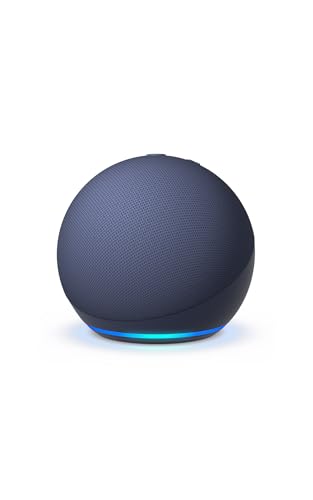
Amazon Echo Dot (newest model)
Best For: Beginners starting an Alexa-based smart home.
AMAZON
Amazon Echo Dot (newest model) - Vibrant sounding speaker, Designed for Alexa+, Great for bedrooms, dining rooms and offices, Deep Sea Blue
The Amazon Echo Dot is the article's recommended starting point for beginners building an Alexa-based smart home. It provides a simple voice-control interface for compatible smart-home devices, making it easier to control lights, plugs, and other connected products without opening separate apps.
Who Should Buy It
This is a strong choice for beginners who already use Alexa or want voice control at the center of their smart home. It also fits well in bedrooms, dining rooms, and offices where a compact smart speaker is useful.
Why We Pick It
It earned the Best Overall position because a smart speaker can become a central voice interface as the smart home grows. The article also emphasizes that beginners can start with a few useful commands and add routines gradually rather than building a complicated system immediately.
Features & Benefits
| Feature | Benefit |
|---|---|
| Alexa voice control | lets users control compatible smart-home devices with voice commands |
| Smart-home integration | provides a central interface for compatible plugs, lights, and other devices |
| Compact speaker design | fits easily into common rooms such as bedrooms, dining rooms, and offices |
Pros & Cons
| Pros | Cons |
|---|---|
| ✓ Simple Alexa-based voice control | ✕ Most useful when paired with compatible smart-home devices |
| ✓ Easy starting point for a beginner smart home | ✕ Alexa ecosystem compatibility may not suit every household |
| ✓ Useful as more compatible devices are added |
A voice assistant becomes more useful as you add compatible devices, but you do not need to build a large system immediately. Start with the commands you actually expect to use and add routines as your setup grows.
Add a Smart Plug for Simple Automation
A smart plug is arguably one of the easiest smart home devices to understand. Instead of replacing an ordinary appliance, you use a compatible smart plug to add connected control to a suitable plug-in device.
Smart plugs are particularly useful for simple schedules and remote or voice control. They also let beginners experiment with automation without changing wiring or installing permanent hardware.
Best for Beginners
Amazon Smart Plug
Best For: First-time smart-home users who want a simple introduction to home automation.

AMAZON
Amazon Smart Plug, Works with Alexa, Simple Setup, Endless Possibilities
The Amazon Smart Plug is one of the simplest ways to introduce automation because it adds connected control to a suitable plug-in appliance without replacing the appliance itself. The article highlights its simple setup, scheduling, remote control, and voice-control potential as practical beginner features.
Who Should Buy It
This is ideal for first-time smart-home users who want to automate an ordinary plug-in appliance without dealing with wiring or permanent installation. It is particularly suitable for users who want a straightforward introduction to schedules and voice commands.
Why We Pick It
It earned the Best for Beginners position because the article identifies smart plugs as one of the easiest smart-home categories to understand and install. It provides a low-complexity way to learn how smart-home automation works before adding more advanced devices.
Features & Benefits
| Feature | Benefit |
|---|---|
| Simple setup | makes it easier for first-time users to add connected control |
| Alexa compatibility | allows compatible appliances to be controlled through Alexa |
| Scheduling and remote control | lets users automate or control suitable connected appliances without manually operating them |
Pros & Cons
| Pros | Cons |
|---|---|
| ✓ Very beginner-friendly | ✕ Only suitable for compatible plug-in appliances |
| ✓ No permanent wiring installation | ✕ Works best within a compatible smart-home ecosystem |
| ✓ Easy way to experiment with automation |
Once a smart plug is working reliably, you can use the same basic automation concept with other compatible smart-home devices.
Use Smart Bulbs for Easy Lighting Automation
Smart lighting is another beginner-friendly upgrade because the result is immediately visible. Depending on the bulb and platform, you can control compatible lighting from an app, use voice commands, schedule lighting, or change the atmosphere of a room.
The supplied Govee option is particularly relevant to this guide because the product research identifies color-changing lighting, multiple preset scenes, music synchronization, and smart control as key features. The important buying consideration is to confirm that the bulb fits the intended fixture and that its network requirements match your home.
Best Smart Lighting
Govee Smart Light Bulbs
Best For: Beginners who want an easy visual upgrade with app and voice-controlled lighting.
GOVEE
Govee Smart Light Bulbs, A19 Color Changing Light Bulb, 800 LM, E26 Base
Govee Smart Light Bulbs provide an easy visual introduction to smart-home automation through app and voice-controlled lighting. The article highlights color-changing lighting, preset scenes, music synchronization, scheduling, and smart control as reasons this option works well for beginners.
Who Should Buy It
These bulbs are a good fit for beginners who want to change the atmosphere of a room without installing complicated smart-home hardware. They are especially useful for users who want app control, voice commands, and colorful lighting effects.
Why We Pick It
They earned the Best Smart Lighting position because smart bulbs offer an immediate and easy-to-see benefit. The article recommends starting with one or two bulbs in a frequently used room instead of replacing every bulb in the home at once.
Features & Benefits
| Feature | Benefit |
|---|---|
| Color-changing lighting | lets users adjust the appearance and atmosphere of a room |
| 800-lumen output | provides useful everyday illumination for compatible fixtures |
| E26 base | fits compatible E26 light sockets |
| Music synchronization | can coordinate lighting effects with music |
| Matter, Alexa, and Google Assistant support | provides compatibility with supported smart-home ecosystems |
Pros & Cons
| Pros | Cons |
|---|---|
| ✓ Easy visual smart-home upgrade | ✕ Requires a compatible E26 fixture |
| ✓ Multiple colors and preset scenes | ✕ Network and platform compatibility should be checked before purchase |
| ✓ Supports major smart-home platforms |
Starting with 1 or 2 bulbs in a frequently used room is usually more practical than replacing every bulb in the house at once.
Choose a Smart Display for Visual Control
A smart display adds a touchscreen to the voice-assistant experience. That can be useful for people who prefer seeing information and controls instead of relying entirely on voice commands.
A display can also make certain smart-home tasks more visual, such as viewing compatible camera feeds, checking information, or interacting with supported controls. It is an optional upgrade rather than a requirement for a beginner setup.
Best Smart Display
Amazon Echo Show 5
Best For: Beginners who prefer visual controls alongside voice commands.
AMAZON
Amazon Echo Show 5 (newest model), Smart display, Designed for Alexa+, 2x the bass and clearer sound, Charcoal
The Amazon Echo Show 5 adds a touchscreen to the Alexa experience, giving beginners a visual way to interact with compatible smart-home controls and information. The article positions it as an optional upgrade for users who prefer seeing controls and information rather than relying entirely on voice commands.
Who Should Buy It
This is best for beginners who want both voice control and a touchscreen interface. It is also useful for people who want a more visual way to interact with compatible smart-home devices and supported camera feeds.
Why We Pick It
It earned the Best Smart Display position because the touchscreen adds another control method to the beginner smart-home experience. The article also notes that a smart display is not essential, making it a useful upgrade after the basics are established.
Features & Benefits
| Feature | Benefit |
|---|---|
| Touchscreen display | provides visual controls and information alongside voice commands |
| Alexa integration | connects the display with compatible Alexa smart-home devices |
| Smart-home controls | provides a visual interface for supported connected devices |
| Camera-feed support | can display compatible security-camera feeds |
Pros & Cons
| Pros | Cons |
|---|---|
| ✓ Combines touchscreen and voice control | ✕ More expensive than a basic smart speaker |
| ✓ Useful visual interface for compatible smart-home devices | ✕ Not necessary for a minimal beginner setup |
| ✓ Good upgrade from a basic smart speaker |
Smart Home Devices for Security and Safety
Smart-home technology is not limited to lights and speakers. Security and safety devices can solve practical problems, especially when you want alerts or remote awareness while you are away from home.
Add a Smart Security Camera
A smart security camera can provide remote viewing and notifications when activity is detected. Outdoor models can also combine monitoring with lighting, which can make them useful around entrances, driveways, yards, and other areas that need visibility.
Before buying an outdoor camera, consider the mounting location, power requirements, Wi-Fi coverage, privacy settings, storage options, and whether the device requires a subscription for particular features.
Best for Outdoor Security
Ring Floodlight Cam Wired Plus
Best For: Beginners who want to add connected outdoor security.
RING
Ring Floodlight Cam Wired Plus, Outdoor home or business security with motion-activated 1080p HD video and floodlights, White
The Ring Floodlight Cam Wired Plus combines an outdoor security camera with motion-activated floodlights, making it a practical option for connected monitoring around entrances, driveways, yards, and other outdoor areas. The article recommends it for beginners who specifically need outdoor security rather than treating a security camera as a mandatory smart-home purchase.
Who Should Buy It
This is best for homeowners or other users who want connected outdoor monitoring and motion-triggered lighting. It makes more sense when there is a specific outdoor security need than when someone is simply starting a basic smart home.
Why We Pick It
It earned the Best for Outdoor Security position because it combines 1080p HD video with motion-activated floodlights in a single outdoor security product. The article also emphasizes checking mounting, power, Wi-Fi, privacy, storage, and subscription requirements before buying.
Features & Benefits
| Feature | Benefit |
|---|---|
| 1080p HD video | provides outdoor video monitoring |
| Motion detection | can trigger alerts or connected activity when movement is detected |
| Floodlights | provide additional illumination when motion is detected |
| Wired installation | provides continuous power but requires more installation planning |
Pros & Cons
| Pros | Cons |
|---|---|
| ✓ Combines camera and floodlights | ✕ Requires wired installation |
| ✓ Designed for outdoor security | ✕ Buyers should check storage and subscription requirements |
| ✓ Strong customer rating and large review base |
Security cameras are better treated as purpose-driven purchases than mandatory beginner gadgets. If your home does not need outdoor monitoring, your first smart-home purchase may be better spent on a simpler device.
Consider a Smart Lock for Keyless Entry
Smart locks can make home access more convenient by connecting the door lock to a smart-home system. Depending on the model, users may be able to use an app, passcode, physical key, fingerprint, or supported voice assistant.
Smart locks require more planning than smart plugs because compatibility with the existing door and lock hardware matters. Installation requirements should be checked before purchasing.
Best Smart Lock
Philips Wi-Fi Smart Deadbolt Lock
Best For: Homeowners looking for connected keyless entry.
PHILIPS
Philips Wi-Fi Smart Deadbolt Lock, Keyless Entry Door Locks for Front Door
The Philips Wi-Fi Smart Deadbolt Lock brings connected keyless entry to the front door and offers several ways to unlock the door. The article highlights app access, passcodes, fingerprint unlocking, physical-key support, voice control, and automatic locking as useful features for a connected home.
Who Should Buy It
This is best for homeowners who want connected keyless entry and are comfortable with a more involved installation than a smart plug or bulb. Buyers should verify that the lock is compatible with their existing door and hardware before purchasing.
Why We Pick It
It earned the Best Smart Lock position because it provides multiple unlocking methods rather than relying on a single form of access. The article also recognizes that smart locks require more planning because door and lock compatibility is important.
Features & Benefits
| Feature | Benefit |
|---|---|
| Wi-Fi connectivity | allows the lock to connect to the smart-home network without relying solely on local physical controls |
| Keypad access | lets users unlock the door with a code |
| Fingerprint unlocking | provides biometric entry |
| App unlocking | allows supported remote or smartphone-based access |
| Alexa and Google voice control | enables supported voice-based smart-home interactions |
| Auto lock | can automatically secure the door after a configured period |
Pros & Cons
| Pros | Cons |
|---|---|
| ✓ Multiple ways to unlock | ✕ Door and hardware compatibility must be checked |
| ✓ Built-in Wi-Fi | ✕ Installation is more involved than plug-in devices |
| ✓ Supports connected remote access and voice control |
Add a Water Leak Sensor for Preventive Protection
Water leak detection is one of the less obvious but potentially valuable smart-home applications. A connected leak sensor can alert you when water is detected in places such as areas around sinks, water heaters, laundry equipment, or other vulnerable locations.
This category is especially useful for homeowners who want their smart home to provide protection rather than only convenience. A leak detector can be added independently of lighting or entertainment devices if water damage is the bigger concern.
Best for Water Leak Protection
YoLink Water Leak Starter Kit
Best For: Homeowners who want early notification of potential water leaks.
YOLINK
YoLink Water Leak Starter Kit: Hub + 4 Leak Sensor 1 (Silent), LoRa Long-Range, App/SMS/Email Alerts, D2D Offline Triggers, 2 AAA Up to 5-Year Battery, Compatible with Alexa/IFTTT/Home Assistant
The YoLink Water Leak Starter Kit gives beginners a way to add water-leak monitoring and alerts to vulnerable areas of the home. The article highlights its long-range leak detection and alerts, making it particularly useful for homeowners who want smart-home technology to provide preventive protection rather than only convenience.
Who Should Buy It
This is best for homeowners who want early warning of potential leaks around sinks, water heaters, laundry equipment, or other vulnerable locations. It is especially relevant when preventing water damage is a higher priority than adding more entertainment or lighting devices.
Why We Pick It
It earned the Best for Water Leak Protection position because the article treats leak detection as a practical safety-focused smart-home category. The supplied product also includes a hub and multiple sensors, making it suitable for monitoring several locations.
Features & Benefits
| Feature | Benefit |
|---|---|
| LoRa long-range connectivity | helps sensors communicate over longer distances than many conventional short-range connections |
| Four leak sensors | allows multiple vulnerable areas to be monitored from one starter kit |
| App, SMS, and email alerts | provides multiple ways to receive leak notifications |
| Offline triggers | can support local sensor-to-sensor actions when internet connectivity is unavailable |
| Long battery life | reduces the frequency of battery replacement |
Pros & Cons
| Pros | Cons |
|---|---|
| ✓ Long-range leak detection | ✕ Requires a hub |
| ✓ Multiple alert options | ✕ More specialized than everyday smart-home convenience devices |
| ✓ Includes four sensors and a hub |
Smart Thermostats: Are They Worth It for Beginners?
A smart thermostat can be worthwhile for beginners who want to automate heating and cooling, but it is not necessarily the best first smart-home purchase. Unlike a smart plug or bulb, a thermostat has to match the home’s existing HVAC system and installation requirements.
The Amazon Smart Thermostat is designed around Alexa and is supplied as a beginner-oriented option for homes that meet its compatibility requirements. The product research specifies that a C-wire is required, so checking the existing system before purchasing is essential.
Best Smart Thermostat
Amazon Smart Thermostat
Best For: Beginners whose HVAC system meets the thermostat’s installation requirements.
AMAZON
Amazon Smart Thermostat, Save money and energy, Works with Alexa and Ring, C-wire required
The Amazon Smart Thermostat adds connected temperature control to compatible HVAC systems and is designed around Alexa. The article considers it a useful option for beginners who want climate automation but stresses that it is not necessarily the best first smart-home purchase because HVAC compatibility and installation requirements must be checked.
Who Should Buy It
This is best for beginners whose existing HVAC system meets the thermostat's compatibility requirements and who want Alexa-based temperature control. It is less suitable as a first purchase for users who are uncomfortable with thermostat installation or whose HVAC system does not meet the requirements.
Why We Pick It
It earned the Best Smart Thermostat position because it provides Alexa-based temperature control while fitting into the broader smart-home ecosystem. The article specifically emphasizes checking the required C-wire and HVAC compatibility before purchase.
Features & Benefits
| Feature | Benefit |
|---|---|
| Alexa integration | provides voice-based temperature control through a compatible Alexa setup |
| Smart temperature control | allows users to manage heating and cooling through connected controls |
| HVAC compatibility requirements | requires buyers to verify their existing system before installation |
| C-wire requirement | means the home's thermostat wiring must meet the product's power requirements |
Pros & Cons
| Pros | Cons |
|---|---|
| ✓ Alexa-based temperature control | ✕ Requires a compatible HVAC system and C-wire |
| ✓ Can add climate control to a connected home | ✕ More complicated to install than a smart plug or bulb |
| ✓ Integrates with compatible Ring and Alexa ecosystems |
If your current HVAC system is incompatible or installation is outside your comfort level, a smart thermostat should not be treated as an essential part of your beginner setup.
How to Build a Smart Home as a Beginner
The easiest way to build a smart home is to add devices gradually. Start with the problem you want to solve instead of starting with a shopping list.
- Choose your ecosystem. Decide whether Alexa, Google Home, Apple Home, or another compatible platform makes the most sense for your existing devices.
- Start with 1 simple device. A smart plug or smart bulb is usually easier to understand than a complicated multi-device installation.
- Add a voice assistant if useful. A compatible smart speaker can make everyday control easier.
- Create simple routines. Automate actions you already perform regularly, such as turning lights off at bedtime.
- Add security or safety devices based on need. A camera, smart lock, or leak detector should solve a specific problem rather than simply fill another category.
- Expand gradually. Once the first devices work reliably, add more compatible products.
- Keep the system organized. Give devices clear names and group them by room or function so voice commands remain easy to understand.
This approach keeps a beginner smart home manageable and makes it easier to identify which types of automation genuinely improve everyday life.
What Smart Home Devices Do You Actually Need?
You do not need all of the products in this guide. The right setup depends on your home, budget, existing technology, and the problems you want to solve.
A Simple Starter Setup
A simple setup can consist of a compatible smart speaker, one smart plug, and one or two smart bulbs. This gives you a basic introduction to voice control, remote control, scheduling, and automation without requiring extensive installation.
For many beginners, that is enough to understand whether a connected home is genuinely useful before spending more money.
A More Connected Setup
A more advanced beginner setup can add a smart display, security camera, smart lock, thermostat, and leak sensors. These devices cover more areas of the home, but each should have a clear purpose.
The important distinction is that a bigger smart home is not automatically a better smart home. A smaller system that works reliably and is easy for everyone in the household to control is often the better result.
Common Smart Home Mistakes Beginners Should Avoid
The biggest beginner mistake is buying products before deciding how they will work together. Compatibility should be checked before purchasing, especially when combining products from different manufacturers.
- Buying without checking compatibility: Confirm the device works with your chosen ecosystem and any required controller.
- Assuming every device needs a hub: Some products connect directly to Wi-Fi, while others require additional hardware.
- Ignoring Wi-Fi requirements: Check whether the product supports your available network bands.
- Buying too many devices at once: Start small and learn the system before expanding.
- Choosing complicated products unnecessarily: If a simple smart plug solves the problem, a more elaborate setup may not be worthwhile.
- Ignoring installation requirements: Locks, thermostats, switches, and wired cameras require more planning than plug-in products.
- Neglecting security: Use strong account credentials, keep devices updated, and enable available security protections.
- Creating too many routines: Begin with a few useful automations instead of turning every action into a routine.
Good organization also matters. Naming devices according to their location or purpose makes voice control easier and reduces confusion as the number of connected devices grows.
Are Smart Home Devices Difficult to Set Up?
Smart home devices are not inherently difficult to set up, but difficulty varies significantly between product categories. Plug-in devices such as smart plugs generally require less physical installation than thermostats, wired cameras, smart switches, or smart locks.
For a first-time user, the easiest path is to begin with a device that requires little or no permanent installation. Once the basic app, ecosystem, and voice-control process are familiar, more advanced devices become easier to manage.
It is also worth remembering that “smart” does not automatically mean “complicated.” The best beginner devices are the ones that reduce the number of steps required to perform an everyday task.
Frequently Asked Questions
What are the best smart home devices for beginners?
The best starting devices are usually smart plugs, smart lights, and a compatible smart speaker. These categories are relatively easy to understand and let beginners experience remote control, voice commands, scheduling, and simple automation before moving to more involved products.
What smart home device should I buy first?
A smart plug or smart bulb is usually the simplest first purchase because it can introduce basic automation without requiring major installation. A smart speaker is also a strong first choice if you want voice control to become part of the system from the beginning.
How do I start a smart home?
Start by choosing a primary ecosystem, then buy 1 or 2 compatible devices that solve an actual problem. Test the setup, create a simple routine, and expand gradually instead of purchasing an entire smart-home system at once.
Do smart home devices need a hub?
No. Some smart-home devices connect directly to Wi-Fi and can be controlled through an app or compatible voice assistant. Other devices may require a hub or compatible controller, so check the individual product’s connectivity requirements before buying.
Do smart home devices work together?
Many smart-home devices can work together when they support the same ecosystem or compatible standards. Checking compatibility before purchasing is important because not every product supports every platform or feature.
Are smart home devices difficult to set up?
Simple plug-in devices are generally easier to set up than products that require wiring or hardware installation. Smart plugs and smart bulbs are good beginner categories because they allow users to learn the basic app and automation process without starting with a complicated installation.
What do I need to start a smart home?
You can start with a compatible smart speaker, smart plug, or smart bulb. You also need a suitable Wi-Fi network and, depending on the devices you choose, possibly a hub or compatible controller.
What is the easiest smart home device to use?
A smart plug is one of the easiest smart-home devices for a first-time user because it can add connected control to a compatible plug-in appliance without replacing the appliance itself. Smart bulbs are another straightforward option.
What is the best smart home ecosystem for beginners?
There is no single ecosystem that is best for every beginner. Amazon Alexa, Google Home, Apple Home, and other platforms can all make sense depending on the devices you already own and the products you plan to add. Choosing one primary ecosystem can make compatibility and everyday control easier.
Can I build a smart home without buying many devices?
Yes. A useful smart home can begin with just 1 or 2 devices. A smart plug, smart bulb, or compatible voice assistant can provide enough automation to determine whether adding more connected devices will genuinely improve your daily routine.
Final Thought
The best smart home devices for beginners are not necessarily the most advanced products. The better approach is to start with simple devices that solve real problems, keep compatibility in mind, and expand only when another device provides a clear benefit.
- Best Overall: Amazon Echo Dot (newest model) | View Now at Amazon
- Best for Beginners: Amazon Smart Plug | View Now at Amazon
- Best Smart Lighting: Govee Smart Light Bulbs | View Now at Amazon
- Best Smart Display: Amazon Echo Show 5 | View Now at Amazon
- Best for Outdoor Security: Ring Floodlight Cam Wired Plus | View Now at Amazon
- Best Smart Lock: Philips Wi-Fi Smart Deadbolt Lock | View Now at Amazon
- Best for Water Leak Protection: YoLink Water Leak Starter Kit | View Now at Amazon
- Best Smart Thermostat: Amazon Smart Thermostat | View Now at Amazon
For most first-time users, starting with an Echo Dot, smart plug, or smart bulb is enough. Once those devices fit naturally into your routine, you can decide whether security, climate control, smart access, or water-leak protection deserves a place in your home.