
Shopping for a cheap gaming laptop under $500 means accepting a few compromises, but you can still find laptops that handle light gaming, esports, older PC titles, emulation, and cloud gaming well. The key is matching the laptop’s processor, graphics, RAM, storage, and operating system to the games you actually play.
Our top pick is the Acer Aspire Go 15 with Ryzen 7 7730U, 16GB RAM, and a 512GB SSD for buyers who want the strongest all-around Windows configuration from this group. For cloud gaming, the Lenovo IdeaPad Flex 5i Chromebook Plus is the better fit, while the KAIGERR Ryzen 7 model offers a large screen, 16GB RAM, and 512GB storage for casual gaming and everyday work.
Best Budget Gaming Laptops at a Glance
The best choice depends on whether you want Windows gaming, light integrated-graphics gaming, or cloud gaming through services such as GeForce NOW.
| Badge | Product | Processor | Graphics | RAM | Storage | Best For |
|---|---|---|---|---|---|---|
| Best Overall | Acer Aspire Go 15 | Ryzen 7 7730U | Radeon Graphics | 16GB | 512GB SSD | Light gaming + everyday use |
| Best Cloud Gaming | Lenovo IdeaPad Flex 5i | Intel Core i3 | Integrated | 8GB | 256GB SSD | Cloud gaming |
| Best Battery & CPU Value | KAIGERR Ryzen 7 | Ryzen 7 | Radeon Vega 8 | 16GB | 512GB SSD | Casual gaming + work |
| Best Budget Pick | Acer Aspire 3 | Ryzen 3 7320U | Radeon Graphics | 8GB | 128GB SSD | Basic gaming + school |
| Best Lightweight | ACEMAGIC LX15 | Intel N97 | Integrated | 16GB | 512GB SSD | Work + casual gaming |
| Best Chromebook | Acer Chromebook Plus 514 | Intel i3-N355 | Integrated | 8GB | 512GB SSD | Cloud + casual gaming |
Important: None of these six configurations should be presented as a traditional dedicated-GPU gaming laptop. They are better categorized as light-gaming, casual-gaming, or cloud-gaming options. Dedicated RTX or GTX models can provide substantially better local gaming performance when you find one within the same budget.
Related Posts
 | Best Gaming Headset for Call of Duty: 4 Top Picks |
 | Best Gaming Headset Brands for PC: Top 5 Picks |
 | Best Smart Home Devices for Beginners: 8 Top Picks |
Acer Aspire Go 15
Best For: Buyers who want the strongest combination of CPU performance, RAM, storage, and everyday usability from these six budget laptops.

ACER
Acer Aspire Go 15 AI Ready Laptop | 15.6" FHD (1920 x 1080) IPS Display | AMD Ryzen 7 7730U | AMD Radeon Graphics | 16GB DDR4 | 512GB PCIe Gen4 SSD | Wi-Fi 6 | Windows 11 Home | AG15-42P-R9FW
The Acer Aspire Go 15 is the strongest all-around Windows option in this roundup for light gaming and everyday use. Its Ryzen 7 7730U, 16GB RAM, 512GB PCIe Gen4 SSD, and Radeon integrated graphics provide a strong foundation, although it is not a substitute for a dedicated-GPU gaming laptop.
Who Should Buy It
This laptop is best for buyers who want one machine for school, work, browsing, streaming, emulation, and lighter games. It is a better fit for casual gaming than demanding modern AAA titles.
Why We Pick It
It earned the Best Overall badge because it combines the strongest CPU, generous memory and storage, and a large Full HD IPS display among these six configurations.
Features & Benefits
| Feature | Benefit |
|---|---|
| AMD Ryzen 7 7730U | Provides strong multi-core performance for multitasking and lighter gaming |
| 16GB DDR4 RAM | Gives Windows applications and games comfortable memory headroom |
| 512GB PCIe Gen4 SSD | Provides fast storage with useful capacity for applications and games |
Pros & Cons
| Pros | Cons |
|---|---|
| ✓ Strong Ryzen 7 processor | ✕ No dedicated GPU |
| ✓ 16GB RAM | ✕ Not ideal for demanding AAA gaming |
| ✓ 512GB SSD |
About
The Acer Aspire Go 15 configuration in this roundup uses an AMD Ryzen 7 7730U processor, 16GB DDR4 memory, 512GB PCIe Gen4 SSD storage, AMD Radeon graphics, and a 15.6-inch Full HD IPS display. That combination gives the laptop plenty of memory and storage for everyday workloads while keeping it suitable for lighter gaming.
The biggest limitation is the integrated Radeon graphics. This laptop should not be treated like an RTX-equipped gaming machine, particularly for demanding modern AAA games.
Features and Benefits
- Ryzen 7 7730U: Provides strong multi-core processing for productivity, multitasking, and lighter gaming.
- 16GB DDR4 RAM: Gives Windows and games enough memory for comfortable multitasking.
- 512GB PCIe Gen4 SSD: Provides considerably more useful storage than the 128GB configurations common in this price category.
- 15.6-inch Full HD IPS display: Provides a large 1920×1080 workspace for gaming, streaming, and productivity.
- Radeon integrated graphics: Supports casual gaming and less demanding titles without requiring a dedicated GPU.
- Wi-Fi 6: Provides modern wireless connectivity for online gaming and cloud gaming.
Pros and Cons
| Pros | Cons |
|---|---|
| 16GB RAM | No dedicated gaming GPU |
| 512GB SSD | Not ideal for demanding AAA gaming |
| Strong Ryzen 7 processor | Gaming performance depends heavily on integrated Radeon graphics |
| Large Full HD display | Gaming performance is below RTX-equipped laptops |
Gaming Performance
The Aspire Go 15 makes the most sense for lighter games, older titles, browser-based gaming, and emulation rather than demanding new releases. The Ryzen 7 processor and 16GB RAM give it a strong foundation, but the integrated graphics remain the main performance limitation.
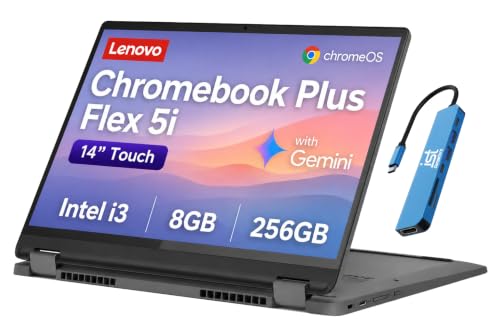
Lenovo IdeaPad Flex 5i Chromebook Plus
Best For: Gamers who primarily want cloud gaming, portability, and a flexible 2-in-1 Chromebook rather than traditional Windows gaming.
LENOVO
Lenovo IdeaPad Flex 5i 14" Chromebook Plus, Intel i3, 8GB RAM, 256GB SSD
The Lenovo IdeaPad Flex 5i Chromebook Plus is the best fit here for cloud gaming rather than traditional local PC gaming. Its Intel Core i3 processor, 8GB RAM, 256GB SSD, ChromeOS, and convertible design make it a flexible option for cloud gaming, browsing, media, and everyday tasks.
Who Should Buy It
This model is best for users who primarily play through supported cloud gaming services and want a portable 2-in-1 Chromebook. It is not intended for demanding Windows PC games installed locally.
Why We Pick It
It earned the Best Cloud Gaming badge because its ChromeOS platform and convertible design complement cloud gaming while keeping the laptop useful for school, work, and entertainment.
Features & Benefits
| Feature | Benefit |
|---|---|
| Intel Core i3 processor | Provides adequate performance for everyday ChromeOS tasks and cloud gaming |
| 8GB RAM | Supports everyday multitasking and game streaming |
| 256GB SSD | Provides faster local storage for applications and files |
Pros & Cons
| Pros | Cons |
|---|---|
| ✓ Excellent cloud-gaming fit | ✕ ChromeOS limits traditional PC gaming |
| ✓ Flexible 2-in-1 design | ✕ Cloud gaming depends on reliable internet |
| ✓ Portable form factor |
About
The Lenovo IdeaPad Flex 5i Chromebook Plus combines an Intel Core i3 processor, 8GB RAM, 256GB SSD storage, and a convertible design. ChromeOS makes this model fundamentally different from the Windows laptops in this roundup, so its strongest gaming use case is cloud gaming rather than installing demanding PC games locally.
Features and Benefits
- Chromebook Plus platform: Provides a streamlined operating system for web applications, streaming, and cloud services.
- 8GB RAM: Handles everyday ChromeOS multitasking and cloud gaming workloads.
- 256GB SSD: Provides faster storage than eMMC-based Chromebook configurations.
- 2-in-1 design: Lets you switch between laptop and tablet-style use.
- Convertible display: Adds flexibility for entertainment, browsing, and gaming.
- Cloud gaming support: Makes the laptop more useful for games streamed from supported services.
Pros and Cons
| Pros | Cons |
|---|---|
| Excellent fit for cloud gaming | ChromeOS limits traditional PC game installation |
| Flexible 2-in-1 design | 8GB RAM |
| Portable form factor | Not designed for demanding local gaming |
| SSD storage | Cloud gaming depends on a reliable internet connection |
Cloud Gaming Experience
The Flex 5i is better viewed as a cloud-gaming terminal than a conventional gaming PC. Games are processed remotely by the cloud service, allowing the Chromebook to focus on streaming the gameplay and responding to your controls.
KAIGERR Ryzen 7 Gaming Laptop
Best For: Buyers who want 16GB RAM, 512GB storage, a large screen, and enough processing power for casual gaming and everyday work.

KAIGERR
KAIGERR Gaming Laptop, 1TB NVMe SSD 16GB RAM Laptop Computer with AMD Ryzen 7 5825U(8C/16T, Up to 4.5GHz), 15.6inch Windows 11 Laptop, Radeon RX Vega 8 Graphics,WiFi 6 for Creative & Business
The KAIGERR Ryzen 7 laptop combines a Ryzen 7 5825U processor, 16GB RAM, 1TB NVMe SSD, and Radeon Vega 8 integrated graphics for casual gaming and everyday work. Its large 15.6-inch screen and generous storage make it a versatile choice, but the integrated graphics limit demanding gaming.
Who Should Buy It
This laptop is best for buyers who want a large Windows laptop for work, study, entertainment, and lighter games. It is not a good choice for buyers who need dedicated-GPU performance.
Why We Pick It
It earned the Best Battery & CPU Value badge because it combines a strong Ryzen 7 processor with 16GB memory, substantial SSD storage, and integrated graphics suitable for lighter gaming.
Features & Benefits
| Feature | Benefit |
|---|---|
| AMD Ryzen 7 5825U | Provides 8-core/16-thread processing for multitasking and productivity |
| 16GB RAM | Provides comfortable memory headroom for work and casual gaming |
| 1TB NVMe SSD | Provides substantial fast storage for applications, documents, and games |
Pros & Cons
| Pros | Cons |
|---|---|
| ✓ 16GB RAM | ✕ No dedicated GPU |
| ✓ 1TB SSD | ✕ Less established brand support |
| ✓ Strong Ryzen 7 processor |
About
The KAIGERR configuration identified by ASIN B0H5Q8TDWV combines a Ryzen 7 processor, 16GB RAM, 512GB NVMe SSD storage, and Radeon Vega 8 integrated graphics. The configuration gives the laptop a useful balance of processing power, memory, and storage for people who want one machine for work, study, entertainment, and lighter games.
One specification deserves special attention before publication: listings can describe the Ryzen 7 configuration differently, so the live Amazon listing should be checked before stating an exact Ryzen 7 model number in the final article.
Features and Benefits
- Ryzen 7 processor: Provides strong CPU performance for multitasking and productivity.
- 16GB RAM: Gives applications and games enough memory for comfortable multitasking.
- 512GB NVMe SSD: Provides useful storage for applications, documents, and a selection of games.
- Radeon Vega 8 graphics: Handles lighter games and older titles better than basic entry-level graphics.
- 15.6-inch display: Provides a comfortable screen size for gaming and productivity.
- Wi-Fi 6: Supports faster wireless connectivity for compatible networks.
Pros and Cons
| Pros | Cons |
|---|---|
| 16GB RAM | No dedicated gaming GPU |
| 512GB NVMe SSD | Not suitable for demanding modern AAA gaming |
| Strong Ryzen 7 platform | Exact processor configuration should be checked before purchase |
| Large 15.6-inch screen | Less established brand support than Acer or Lenovo |
Acer Aspire 3 A315-24P-R7VH
Best For: Buyers who want an inexpensive Windows laptop for school, work, streaming, and basic gaming.

ACER
acer Aspire 3 A315-24P-R7VH Slim Laptop | 15.6" Full HD | AMD Ryzen 3 7320U Quad-Core | AMD Radeon Graphics | 8GB LPDDR5 | 128GB NVMe SSD | Wi-Fi 6 | Windows 11 Home
The Acer Aspire 3 is the budget-focused Windows option for basic gaming, school, work, and everyday computing. The Ryzen 3 7320U, 8GB LPDDR5, 128GB NVMe SSD, and Radeon graphics are suitable for lighter workloads, but the limited storage and integrated graphics make it unsuitable for serious gaming.
Who Should Buy It
This laptop is best for students and budget-conscious buyers who want everyday Windows performance with some casual gaming capability. Buyers with large game libraries should consider a model with more storage.
Why We Pick It
It earned the Best Budget Pick badge because it provides a Full HD display, NVMe storage, Radeon graphics, and Wi-Fi 6 at an entry-level price.
Features & Benefits
| Feature | Benefit |
|---|---|
| AMD Ryzen 3 7320U | Provides adequate performance for everyday computing and lighter gaming |
| 8GB LPDDR5 RAM | Supports basic multitasking |
| 128GB NVMe SSD | Provides fast boot and application loading |
Pros & Cons
| Pros | Cons |
|---|---|
| ✓ Affordable entry point | ✕ Only 8GB RAM |
| ✓ Full HD display | ✕ 128GB storage is restrictive for gaming |
| ✓ Fast NVMe storage |
About
The Acer Aspire 3 A315-24P-R7VH configuration associated with ASIN B0BS4BP8FB uses an AMD Ryzen 3 7320U processor, 8GB LPDDR5 memory, 128GB NVMe SSD storage, and AMD Radeon graphics on a 15.6-inch Full HD display.
This is an important correction from the source material. The source article describes a Ryzen 7 5700U, 16GB RAM, and 512GB SSD configuration, but those specifications do not match the B0BS4BP8FB product configuration supplied by the Amazon Deal Finder.
Features and Benefits
- Ryzen 3 7320U: Provides enough processing power for everyday computing and lighter workloads.
- 8GB LPDDR5: Provides adequate memory for basic multitasking.
- 128GB NVMe SSD: Delivers fast boot and application loading.
- 15.6-inch Full HD display: Provides a clear 1920×1080 viewing area.
- Radeon graphics: Supports basic and lighter gaming workloads.
- Wi-Fi 6: Provides modern wireless connectivity.
Pros and Cons
| Pros | Cons |
|---|---|
| Affordable entry price | Only 8GB RAM |
| Full HD display | 128GB storage is restrictive for gaming |
| Fast NVMe storage | Not a dedicated-GPU gaming laptop |
| Lightweight everyday platform | Limited suitability for demanding games |
ACEMAGIC 2025 LX15
Best For: Students, remote workers, and casual gamers who value 16GB RAM and 512GB storage at a low price.

ACEMAGIC
ACEMAGIC 2025 LX15 Laptop, 15.6-inch FHD (1920 x 1080) Display, Intel N97 Processor, 16GB DDR4 RAM, 512GB SSD, Windows 11 Pro, Wi-Fi 5, 180° Fold, Ideal for Work & Study
The ACEMAGIC LX15 is a general-purpose Windows laptop included for work and casual gaming rather than dedicated gaming performance. Its Intel N97 processor, 16GB RAM, 512GB SSD, and 15.6-inch Full HD display provide a useful everyday setup, while integrated graphics limit demanding games.
Who Should Buy It
This laptop is best for students, travelers, and users who want a lightweight computer for work, study, entertainment, and occasional casual gaming. It is not intended for high-performance local gaming.
Why We Pick It
It earned the Best Lightweight badge because the article emphasizes its portability, 16GB RAM, 512GB storage, Full HD display, connectivity, and suitability for work and casual gaming.
Features & Benefits
| Feature | Benefit |
|---|---|
| Intel N97 processor | Handles everyday computing and casual workloads |
| 16GB DDR4 RAM | Provides comfortable multitasking |
| 512GB SSD | Offers useful fast storage for applications and files |
Pros & Cons
| Pros | Cons |
|---|---|
| ✓ 16GB RAM | ✕ Integrated graphics limit gaming |
| ✓ 512GB SSD | ✕ Entry-level processor |
| ✓ Full HD display |
About
The ACEMAGIC LX15 uses an Intel N97 processor, 16GB DDR4 RAM, 512GB SSD storage, and a 15.6-inch Full HD display. The configuration is designed primarily for work, study, browsing, streaming, and general computing rather than demanding gaming.
The 16GB memory and 512GB SSD make the laptop attractive for multitasking, but the integrated graphics and entry-level processor limit its usefulness for modern 3D games.
Features and Benefits
- Intel N97 processor: Provides sufficient performance for everyday computing and casual workloads.
- 16GB DDR4 RAM: Helps keep multiple applications and browser tabs responsive.
- 512GB SSD: Provides considerably more usable storage than 128GB budget laptops.
- 15.6-inch Full HD display: Provides a practical screen size for work and entertainment.
- 180-degree hinge: Adds flexibility when positioning the screen.
- Windows 11 Pro: Provides a familiar Windows environment for productivity and compatible applications.
Pros and Cons
| Pros | Cons |
|---|---|
| 16GB RAM | Entry-level processor |
| 512GB SSD | Integrated graphics limit gaming performance |
| Full HD display | Not suitable for demanding AAA games |
| Good everyday value | Less gaming-focused than dedicated gaming laptops |
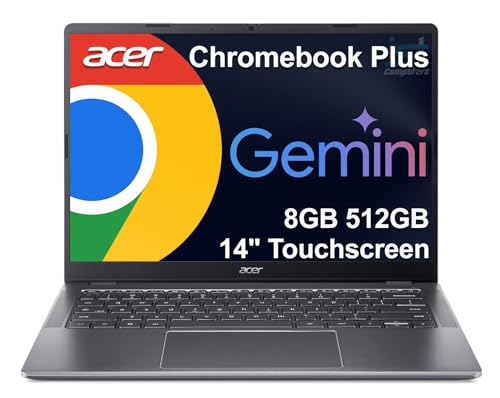
Acer Chromebook Plus 514
Best For: Students and casual gamers who want a lightweight Chromebook for cloud gaming, streaming, and everyday tasks.
IST COMPUTERS
Acer Chromebook Plus 514 14" Touchscreen, Intel i3-N355, 8GB RAM, 512GB SSD
The Acer Chromebook Plus 514 is a portable ChromeOS option for cloud gaming, casual gaming, school, and everyday use. Its Intel i3-N355 processor, 8GB RAM, 512GB SSD, and 14-inch touchscreen make it convenient, but integrated graphics and ChromeOS limit demanding local PC gaming.
Who Should Buy It
This model is best for students, professionals, and casual gamers who prefer ChromeOS and want a compact touchscreen laptop. It is better suited to cloud gaming than demanding locally installed PC games.
Why We Pick It
It earned the Best Chromebook badge because the article highlights its portability, cloud-gaming suitability, touchscreen, and generous 512GB storage.
Features & Benefits
| Feature | Benefit |
|---|---|
| Intel i3-N355 processor | Provides responsive performance for everyday Chromebook workloads |
| 8GB RAM | Supports multitasking and cloud gaming |
| 512GB SSD | Provides generous fast storage for its class |
Pros & Cons
| Pros | Cons |
|---|---|
| ✓ 512GB SSD | ✕ ChromeOS limits traditional PC gaming |
| ✓ Portable touchscreen design | ✕ Integrated graphics limit demanding games |
| ✓ Good for cloud gaming |
About
The Acer Chromebook Plus 514 configuration identified by ASIN B0DYNLGYHG features a 14-inch touchscreen, Intel i3-N355 processor, 8GB RAM, and 512GB SSD storage. ChromeOS makes it better suited to cloud gaming and casual gaming than demanding locally installed Windows games.
The 512GB storage is a useful advantage for a Chromebook in this price range, although storage capacity alone does not turn the system into a dedicated gaming machine.
Features and Benefits
- Intel i3-N355: Provides responsive performance for everyday Chromebook workloads.
- 8GB RAM: Supports everyday multitasking and cloud-based gaming.
- 512GB SSD: Gives the Chromebook generous storage for its category.
- 14-inch touchscreen: Provides a compact format for mobile use and entertainment.
- ChromeOS: Works well with web applications, streaming, and supported cloud gaming services.
- Portable design: Makes the laptop convenient for students and travelers.
Pros and Cons
| Pros | Cons |
|---|---|
| 512GB storage | 8GB RAM |
| Portable 14-inch design | ChromeOS limits traditional Windows gaming |
| Good cloud-gaming platform | Integrated graphics |
| Touchscreen | Not designed for demanding AAA gaming |
Which Laptop Is Best for Gaming Under $500?
The best option depends on what you mean by gaming because these six laptops fall into three different categories: light Windows gaming, casual gaming, and cloud gaming.
| If You Want… | Choose… | Why |
|---|---|---|
| Best overall balance | Acer Aspire Go 15 | Ryzen 7, 16GB RAM, 512GB SSD |
| Cloud gaming | Lenovo IdeaPad Flex 5i | ChromeOS and convertible design |
| More RAM and storage | KAIGERR Ryzen 7 | 16GB RAM and 512GB SSD |
| Lowest-cost Windows option | Acer Aspire 3 | Basic Ryzen platform and Full HD display |
| Work plus casual gaming | ACEMAGIC LX15 | 16GB RAM and 512GB SSD |
| Portable Chromebook gaming | Acer Chromebook Plus 514 | 14-inch touchscreen and 512GB SSD |
What to Look for in a Cheap Gaming Laptop
A budget gaming laptop should be judged by its graphics hardware first, followed by RAM, storage, CPU performance, display quality, cooling, and upgrade potential.
Check the GPU First
The GPU is the most important component for gaming because it determines how well the laptop renders game graphics. Integrated Radeon or Intel graphics can handle lighter games, but dedicated GPUs such as the RTX 3050, RTX 2050, GTX 1650, or newer RTX models are much better choices for serious local gaming.
Choose at Least 8GB RAM
8GB RAM is the practical minimum for a budget gaming laptop, while 16GB is the better target. The Acer Aspire Go 15 and KAIGERR configuration stand out here because both provide 16GB RAM.
Prefer an SSD
A 512GB SSD is preferable when gaming because modern games can consume substantial storage space. The Acer Aspire 3’s 128GB SSD is enough for Windows and basic applications, but it can fill quickly if you install several large games.
Look for Full HD Resolution
A 1920×1080 display provides a good baseline for budget gaming. A Full HD screen also makes everyday activities such as browsing, streaming, and document work more comfortable than a low-resolution panel.
Consider Cloud Gaming
Cloud gaming changes the hardware requirements because demanding game processing happens on remote servers. A Chromebook such as the Lenovo IdeaPad Flex 5i can therefore make sense for someone who has a strong internet connection and primarily plays through supported cloud gaming services.
Do Not Trust the Word “Gaming” Alone
A laptop marketed as a gaming laptop does not automatically contain a dedicated GPU. Several inexpensive models use integrated graphics while relying on generous RAM and storage to create a better overall computing experience.
What We Noticed
The biggest difference between the products in this roundup is not the amount of RAM or storage but the type of graphics hardware. The six models are much closer to budget laptops with gaming capability than traditional gaming laptops with dedicated GPUs.
That distinction is important because a laptop with 16GB RAM and a 512GB SSD can still struggle with demanding 3D games if its graphics processor is integrated.
How We Chose
We based this roundup on the exact product configurations identified through the Amazon Deal Finder rather than copying specifications from another article. That approach matters because the same laptop family can have several CPU, RAM, storage, and graphics configurations.
- Exact ASIN: Each product uses the ASIN identified by the product database.
- Configuration: CPU, RAM, storage, graphics, and display information was matched to the supplied product record.
- Gaming capability: Products were classified according to their actual graphics hardware rather than marketing language.
- Value: RAM, SSD capacity, processor performance, and usability were considered together.
- Gaming type: Local gaming, light gaming, casual gaming, and cloud gaming were separated to avoid misleading comparisons.
- Price: Because Amazon prices change frequently, the $500 ceiling should be checked against the live listing before purchase.
Best Cheap Gaming Laptop Under $500: FAQs
What is the best gaming laptop under $500?
The Acer Aspire Go 15 is the strongest all-around option from these six configurations because it combines a Ryzen 7 7730U processor, 16GB RAM, 512GB SSD, and a Full HD display. However, it uses integrated Radeon graphics, so it is better for light gaming than demanding AAA games.
Can you get a good gaming laptop for under $500?
Yes, but most new laptops under $500 are better suited to light gaming, older games, esports, or cloud gaming than demanding modern AAA titles. A dedicated-GPU laptop is the better target if serious local gaming is the priority.
Can these laptops run Fortnite?
Some of these laptops can handle lighter competitive games such as Fortnite with appropriate settings, but performance will vary considerably because these configurations use integrated graphics. A dedicated-GPU model would provide more consistent gaming performance.
Is 16GB RAM enough for gaming?
Yes, 16GB RAM is a good target for budget gaming, but RAM alone does not determine gaming performance. The GPU remains the more important component for demanding games.
Final Thoughts
The best cheap gaming laptop under $500 depends on the type of gaming you expect to do. For an all-around Windows laptop, the Acer Aspire Go 15 offers the strongest combination of Ryzen processing power, 16GB RAM, 512GB storage, and a Full HD display.
For cloud gaming, the Lenovo IdeaPad Flex 5i Chromebook Plus is the more logical choice. The KAIGERR Ryzen 7 model is another interesting option for buyers who want 16GB RAM and 512GB storage, while the Acer Aspire 3 and ACEMAGIC LX15 make more sense as affordable everyday laptops with casual gaming capability.
- Acer Aspire Go 15 — Best Overall
- Lenovo IdeaPad Flex 5i Chromebook Plus — Best for Cloud Gaming
- KAIGERR Ryzen 7 Gaming Laptop — Best Battery and CPU Value
- Acer Aspire 3 A315-24P-R7VH — Best Budget Pick
- ACEMAGIC 2025 LX15 — Best Lightweight Option
- Acer Chromebook Plus 514 — Best Chromebook
For gaming accessories, see what is a good gaming headset, best gaming headset brands for PC, and best gaming headset for Call of Duty. For PC power requirements, see how to choose the right power supply for PC.