
Choosing the right power supply for PC starts with matching the PSU to your hardware, power requirements, upgrade plans, and case compatibility instead of buying the highest wattage available. A quality power supply delivers stable power, protects expensive components, improves efficiency, and gives your PC room to grow. If you’re also upgrading other PC accessories, our guide to gaming headset brands for PC may help complete your setup.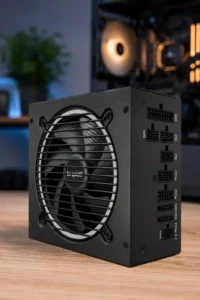
Why Choosing the Right Power Supply Matters
The power supply unit (PSU) is the foundation of every desktop computer because every component depends on clean, stable electricity. During my first custom PC build, I focused almost entirely on the processor and graphics card, assuming any PSU with enough watts would work. That mistake taught me that the quality of the power supply often determines how reliable the entire system becomes.
A properly selected PSU protects expensive hardware, improves long-term stability, reduces electrical waste, and supports future upgrades without forcing another replacement. Choosing correctly also minimizes unexpected shutdowns, random crashes, and hardware failures caused by unstable voltage.
Stable System Performance
A quality PC power supply delivers consistent voltage even when the processor and graphics card suddenly demand more power. This becomes especially important during gaming, video editing, software compiling, or running multiple applications simultaneously.
Related Posts
 | How to Choose a Portable Power Bank: Complete Guide |
 | How to Use Onn Power Bank: Charging & Troubleshooting |
 | How to Test a Power Bank: Capacity, Voltage & Current |
Stable voltage helps prevent freezes, blue screens, unexpected reboots, and corrupted files. Instead of operating near its maximum capacity, the PSU maintains comfortable headroom for temporary power spikes.
Hardware Protection
The right power supply protects your investment through built-in safety features such as Over Voltage Protection (OVP), Over Current Protection (OCP), Over Power Protection (OPP), Short Circuit Protection (SCP), and Over Temperature Protection (OTP).
These protections automatically shut down the PSU before excessive voltage or heat damages expensive hardware. Replacing a power supply is far cheaper than replacing a graphics card or motherboard.
Upgrade Flexibility
Selecting a PSU with reasonable headroom makes future upgrades much easier. For example, replacing a mid-range graphics card with a more powerful model often requires additional PCIe connectors and higher wattage.
A power supply chosen only for today’s hardware may need replacing sooner than expected. Meanwhile, a properly sized PSU can serve through several upgrade cycles.
Energy Efficiency
Higher-efficiency power supplies waste less electricity as heat. An 80 Plus Gold model typically operates cooler and quieter than a lower-efficiency alternative while reducing long-term electricity consumption.
Although efficient models usually cost more initially, lower operating temperatures often improve component lifespan and reduce fan noise during daily use.
System Longevity
A reliable PSU contributes directly to the lifespan of your entire computer. Clean power reduces electrical stress on processors, graphics cards, storage drives, and memory modules.
Many premium power supplies also include long warranties because manufacturers expect them to remain dependable for years of continuous use.
Understand What a Power Supply Does
A power supply unit converts alternating current (AC) from your wall outlet into the low-voltage direct current (DC) that every desktop component requires. Without this conversion, the motherboard, processor, graphics card, storage devices, and cooling system cannot operate safely.
How a PSU Powers Every PC Component
The PSU distributes different voltages across multiple rails to individual components. Modern systems primarily depend on the 12V rail, which supplies most of the processor and graphics card’s power demands.
Every cable leaving the PSU serves a specific purpose. The 24-pin connector powers the motherboard, the CPU cable powers the processor, PCIe connectors power graphics cards, and SATA cables provide power for SSDs, hard drives, and accessories.
Why Cheap Power Supplies Can Damage Hardware
Budget power supplies sometimes advertise high wattage while delivering inconsistent voltage under heavy loads. During demanding workloads, unstable power can trigger crashes or gradually reduce component lifespan.
After helping a friend troubleshoot random gaming crashes, we discovered the graphics card wasn’t the problem. Replacing a low-quality PSU with a reputable model completely eliminated the issue because voltage delivery became stable under load.
Signs Your Current PSU Isn’t Good Enough
Your existing power supply may need replacement if your PC randomly restarts, shuts down during gaming, emits unusual electrical noise, struggles after hardware upgrades, or lacks the necessary connectors for a modern graphics card.
Another warning sign is operating very close to the PSU’s rated capacity. Running near maximum output continuously generates more heat, increases fan noise, and leaves little room for temporary power spikes.
How to Choose the Right Power Supply for PC
Choosing the right power supply involves calculating realistic power requirements, selecting the correct efficiency rating, confirming compatibility, and ensuring enough upgrade headroom for future hardware.
Calculate Your PC Power Supply Requirements
Start by estimating the combined power draw of your processor, graphics card, storage drives, cooling system, RGB accessories, and other installed hardware. Most modern gaming systems consume far less power than many people expect.
Instead of guessing, I usually compare multiple PSU calculators because each uses slightly different assumptions. If the estimates consistently recommend around 550 watts, selecting a quality 650W or 750W unit usually provides comfortable upgrade flexibility.
Choose the Correct Wattage
The ideal wattage depends entirely on your hardware configuration rather than your budget. Office computers often operate comfortably on 450W to 550W, while mainstream gaming systems usually perform best between 650W and 850W.
High-end workstations equipped with flagship graphics cards and overclocked processors frequently benefit from 1000W or higher power supplies to accommodate heavy workloads and transient GPU power spikes.
Understand 80 Plus Efficiency Ratings
The 80 Plus certification measures how efficiently a power supply converts electricity into usable power. Higher certifications generate less waste heat and generally indicate better internal components.
For most builders, 80 Plus Gold offers the best balance between efficiency, operating temperature, price, and long-term value. Platinum and Titanium models mainly benefit enthusiasts, creators, and systems that remain under heavy loads for extended periods.
Choose Between Non-Modular, Semi-Modular and Fully Modular PSUs
Non-modular power supplies permanently attach every cable, making them affordable but harder to manage inside the case. Semi-modular models keep essential cables attached while allowing optional cables to be removed.
Fully modular power supplies provide the cleanest cable management because every cable is detachable. They simplify installation, improve airflow, and make future upgrades much easier, especially inside compact PC cases.
Select the Correct PSU Form Factor
Most desktop computers use the standard ATX power supply form factor, while compact Mini-ITX systems often require SFX or SFX-L models.
Before purchasing, always verify your computer case supports the intended PSU dimensions. Even two ATX power supplies can vary in length depending on their wattage and internal cooling design.
Check Motherboard and GPU Compatibility
Modern graphics cards increasingly require native PCIe 5.1 or 12V-2×6 connectors. Meanwhile, many newer power supplies comply with the latest ATX 3.1 standard, which better handles temporary GPU power excursions.
If you’re planning future upgrades, selecting an ATX 3.1-compatible PSU today helps avoid replacing the power supply later when installing next-generation graphics cards.
Check Available Connectors Before Buying
Connector availability matters just as much as total wattage. Confirm your PSU includes sufficient CPU power connectors, PCIe cables, SATA power connectors, and any specialty cables your hardware requires.
Running adapters unnecessarily increases cable clutter and introduces additional connection points that may become unreliable over time.
Consider Future Upgrades
A little extra capacity today can postpone another PSU purchase for years. Choosing a power supply with moderate headroom allows future processor, graphics card, and storage upgrades without immediately exceeding the PSU’s limits.
Planning ahead becomes especially valuable if you expect to upgrade to more demanding GPUs, multiple NVMe drives, or larger cooling systems within the next few years.
Recommended Power Supplies for Different Builds
The best power supply depends on your budget, graphics card, upgrade plans, and the features you value most. Rather than recommending the highest wattage available, I prefer choosing models that balance reliability, efficiency, warranty, and compatibility with modern hardware.
The following power supplies represent excellent choices across different budgets and use cases. Each model supports a different type of PC build while offering proven reliability from respected manufacturers.
MSI MAG A650BN
Best For: Budget gaming PCs and everyday desktop builds.

MSI
MSI MAG A650BN, Non-Modular Compact 650W Power Supply, 80+ Bronze, Low-Noise Fan, Active PFC Design, 5 Year Warranty
The MSI MAG A650BN is the budget-oriented choice in this article, providing 650W of capacity for entry-level gaming PCs and everyday desktop builds. Its 80 Plus Bronze efficiency, active PFC design, low-noise fan, and compact construction make it a practical option when reliable power matters more than premium modular features.
Who Should Buy It
This PSU is best for budget gaming PCs, office desktops, and entry-level systems using moderate-power graphics cards. It is particularly suitable for builders who need a reputable 650W unit without paying extra for fully modular cabling.
Why We Pick It
It earned a spot because the article recommends quality 550W–650W PSUs for budget gaming systems and emphasizes that PSU quality matters more than buying the highest advertised wattage. The 650W capacity also provides useful headroom for many entry-level gaming upgrades.
Features & Benefits
| Feature | Benefit |
|---|---|
| 650W capacity | provides enough power for many entry-level gaming and everyday desktop systems |
| 80 Plus Bronze | reduces wasted electricity compared with lower-efficiency designs |
| Non-modular design | keeps the purchase cost lower but leaves all cables permanently attached |
| Active PFC | improves how efficiently the PSU draws power from the electrical supply |
| Low-noise fan | helps keep operating noise under control during normal workloads |
Pros & Cons
| Pros | Cons |
|---|---|
| ✓ Affordable 650W capacity | ✕ Non-modular cables create more cable clutter |
| ✓ Reputable MSI design | ✕ 80 Plus Bronze is less efficient than Gold or Platinum models |
| ✓ Low-noise cooling |
CORSAIR RM750e (2025)
Best For: Most gamers looking for long-term reliability and future GPU upgrades.

CORSAIR
CORSAIR RM750e ATX 3.1 PCIe 5.1 Ready Fully Modular 750W Power Supply – 12V-2x6 Cable Included, Cybenetics Gold Efficiency, 105°C-Rated Capacitors, Modern Standby Mode – Black
The CORSAIR RM750e is the article's strongest all-around choice for gamers who want a balance of capacity, efficiency, modern GPU compatibility, and upgrade flexibility. Its 750W output fits the article's recommended range for mainstream gaming PCs while ATX 3.1, PCIe 5.1 readiness, and the included 12V-2x6 cable make it well suited to newer graphics cards.
Who Should Buy It
This PSU is a strong choice for mainstream gaming PCs and builders planning future GPU upgrades. It is especially useful for users who want clean cable management and modern connectivity without moving all the way to a 1000W enthusiast PSU.
Why We Pick It
It earned the Best Overall position because 750W sits directly in the article's recommended range for many mid-range gaming systems while leaving meaningful headroom for upgrades. Fully modular cabling also supports the article's emphasis on easier installation, improved airflow, and cleaner builds.
Features & Benefits
| Feature | Benefit |
|---|---|
| 750W capacity | provides comfortable power for many mainstream gaming systems |
| ATX 3.1 | improves compatibility with modern hardware and transient GPU power demands |
| PCIe 5.1 ready | supports newer graphics-card power requirements |
| 12V-2x6 cable | provides a modern native connection for compatible GPUs |
| Fully modular design | allows unused cables to be removed for cleaner cable management |
| Cybenetics Gold efficiency | indicates strong efficiency with less wasted energy and heat |
| 105°C-rated capacitors | designed to tolerate demanding operating conditions |
Pros & Cons
| Pros | Cons |
|---|---|
| ✓ Excellent balance of wattage and features | ✕ Costs more than basic Bronze PSUs |
| ✓ Modern ATX 3.1 and 12V-2x6 support | ✕ 750W may be insufficient for some flagship multi-GPU or extreme workstation builds |
| ✓ Fully modular cable management |
be quiet! Pure Power 13 M 850W
Best For: Quiet gaming PCs and creator workstations.

BE QUIET!
be quiet! Pure Power 13 M 850W, ATX 3.1, Fully Modular PSU, 80+ Gold
The be quiet! Pure Power 13 M 850W is designed for users who want higher capacity, modern GPU compatibility, and quiet operation. The article specifically positions this model for quiet gaming PCs and creator workstations, with ATX 3.1 support, fully modular cabling, 80 Plus Gold efficiency, and a semi-passive 120mm fan.
Who Should Buy It
This PSU is best for gamers, content creators, and workstation users who want 850W of capacity without sacrificing quiet operation. It is a good fit for systems that place sustained demands on both the CPU and GPU.
Why We Pick It
It earned its place because the article recommends 850W for mid-range to high-end gaming and content creation systems. Its Gold efficiency, fully modular design, and quiet-focused cooling align closely with the article's priorities for efficiency, cable management, and long-term reliability.
Features & Benefits
| Feature | Benefit |
|---|---|
| 850W capacity | provides substantial headroom for demanding gaming and workstation hardware |
| ATX 3.1 | improves readiness for modern graphics cards and transient power demands |
| Fully modular design | lets users install only the cables they need |
| 80 Plus Gold | provides efficient operation with reduced heat and wasted electricity |
| PCIe 5.1 ready | supports modern GPU power requirements |
| 12V-2x6 600W support | provides a high-power native connection for compatible graphics cards |
| Semi-passive 120mm fan | can reduce fan noise during lighter workloads |
Pros & Cons
| Pros | Cons |
|---|---|
| ✓ Quiet-focused cooling design | ✕ More expensive than entry-level PSUs |
| ✓ Strong 850W capacity | ✕ 850W is unnecessary for low-power office systems |
| ✓ Modern GPU connectivity |
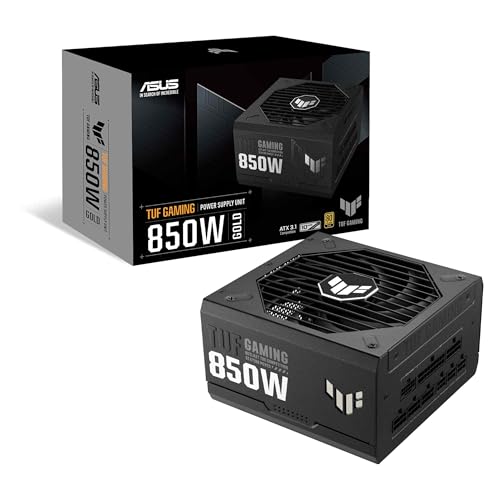
ASUS TUF Gaming 850W Gold
Best For: High-performance gaming systems using RTX 4070, RTX 4080, or similar graphics cards.
ASUS
ASUS TUF Gaming 850W Gold (850 Watt, ATX 3.1 Compatible, Fully Modular Power Supply, 80+ Gold, Military-Grade Components, Dual Ball Bearing, Axial-tech Fan, PCB Coating, 10 Year Warranty)
The ASUS TUF Gaming 850W Gold is aimed at high-performance gaming PCs that need more capacity and modern GPU compatibility. Its 850W output, ATX 3.1 compatibility, fully modular design, 80 Plus Gold efficiency, and 10-year warranty make it a strong match for the article's high-end gaming recommendations.
Who Should Buy It
This PSU is best for gamers building around powerful graphics cards such as RTX 4070, RTX 4080, or comparable hardware. It is also suitable for builders who want long-term reliability and enough capacity for future upgrades.
Why We Pick It
The article selects this model for high-performance gaming systems because 850W is within its recommended range for mid-range and high-end PCs. The fully modular design, Gold efficiency, modern standard compatibility, and long warranty reinforce the article's focus on upgrade flexibility and system longevity.
Features & Benefits
| Feature | Benefit |
|---|---|
| 850W capacity | provides comfortable headroom for high-performance gaming hardware |
| ATX 3.1 compatibility | improves readiness for modern GPU power demands |
| Fully modular design | simplifies cable management and future upgrades |
| 80 Plus Gold | balances efficiency, heat output, and operating cost |
| Military-grade components | are designed for demanding operating conditions |
| Dual ball-bearing fan | supports durable cooling operation |
| Axial-tech fan | improves airflow through the PSU |
| 10-year warranty | provides long-term manufacturer coverage |
Pros & Cons
| Pros | Cons |
|---|---|
| ✓ Excellent for high-performance gaming | ✕ More capacity than most office or entry-level PCs need |
| ✓ Long 10-year warranty | ✕ Premium features increase the purchase price |
| ✓ Fully modular modern design |
ASUS ROG Strix 1000W Platinum
Best For: Enthusiast PCs, overclocking, and flagship graphics cards.

ASUS
ASUS ROG Strix 1000W Platinum (Fully Modular Power Supply, 80 Plus Platinum Certified, ATX 3.1, Cybenetics Lambda A+, GaN MOSFET, GPU-First Intelligent Voltage Stabilizer, 10-Year Warranty)
The ASUS ROG Strix 1000W Platinum is the premium option for enthusiast PCs, overclocking, and systems using flagship graphics cards. Its 1000W capacity, 80 Plus Platinum certification, ATX 3.1 support, fully modular design, GaN MOSFET technology, and GPU-focused voltage stabilization provide the high-end platform the article recommends for demanding builds.
Who Should Buy It
This PSU is best for enthusiasts, high-end gamers, professional workstations, and users running power-hungry flagship GPUs. It makes the most sense for systems that genuinely need 1000W or more rather than ordinary gaming or office PCs.
Why We Pick It
It earned the Premium Pick position because the article recommends 1000W or higher for flagship graphics cards, overclocked processors, AI workloads, and demanding rendering systems. Platinum efficiency and advanced power-delivery features also suit users who expect sustained heavy loads and want maximum upgrade headroom.
Features & Benefits
| Feature | Benefit |
|---|---|
| 1000W capacity | provides substantial power for flagship GPUs and high-end processors |
| 80 Plus Platinum | improves efficiency and reduces wasted energy and heat compared with lower-rated designs |
| ATX 3.1 | supports modern power requirements and transient GPU excursions |
| Fully modular design | provides clean cable management and easier hardware upgrades |
| Cybenetics Lambda A+ | indicates a strong noise-performance classification |
| GaN MOSFET | enables efficient power conversion in a compact modern design |
| GPU-First Intelligent Voltage Stabilizer | focuses voltage regulation on demanding GPU loads |
| 10-year warranty | provides long-term coverage for an enthusiast-grade investment |
Pros & Cons
| Pros | Cons |
|---|---|
| ✓ Excellent 1000W capacity for flagship hardware | ✕ Overkill for most mainstream PCs |
| ✓ Premium Platinum efficiency | ✕ Higher price than lower-wattage Gold PSUs |
| ✓ Advanced GPU power management |
Power Supply Wattage Guide by PC Type
Selecting the correct wattage keeps your computer stable while avoiding unnecessary spending. The ideal PSU should operate comfortably below its maximum output, giving enough headroom for temporary power spikes and future upgrades.
| PC Type | Recommended PSU | Typical Wattage | Ideal Efficiency | Suitable For |
|---|---|---|---|---|
| Office PC | 450W–550W | 450–550W | 80 Plus Bronze | Browsing, Office, Streaming |
| Entry-Level Gaming | 550W–650W | 550–650W | 80 Plus Bronze/Gold | RTX 3050, RTX 4060 |
| Mainstream Gaming | 650W–850W | 650–850W | 80 Plus Gold | RTX 4070, RX 7800 XT |
| High-End Gaming | 850W–1000W | 850–1000W | 80 Plus Gold/Platinum | RTX 4080, RTX 5080 |
| Content Creation | 850W–1000W | 850–1000W | 80 Plus Gold+ | Video editing, 3D rendering |
| AI Workstation | 1000W–1600W | 1000W+ | 80 Plus Platinum/Titanium | RTX 5090, Multi-GPU |
Office PCs
Office computers rarely exceed 250 watts during normal workloads, making a quality 450W or 550W power supply more than sufficient. Choosing excessive wattage here increases cost without providing meaningful benefits.
If your office setup also includes multiple displays or USB accessories, the additional capacity still leaves comfortable operating headroom.
Budget Gaming PCs
Gaming systems using graphics cards such as the RTX 4060 generally perform well with a quality 550W to 650W PSU. Choosing a reputable model matters far more than simply buying the cheapest unit advertising the required wattage.
While helping a friend assemble a first gaming PC, we selected a 650W Gold-rated PSU instead of a generic 750W model. The quieter fan, stronger protections, and longer warranty made the better-quality PSU the smarter purchase.
Mid-Range Gaming PCs
Most gamers building around an RTX 4070, RX 7800 XT, or similar graphics card should target a quality 750W or 850W power supply. This range provides excellent efficiency while leaving room for processor upgrades later.
Fully modular models also simplify cable management, especially in modern cases with tempered-glass side panels.
High-End Gaming PCs
Systems equipped with flagship graphics cards benefit from 850W to 1000W power supplies that support ATX 3.1 and PCIe 5.1 standards. Native 12V-2×6 connectors also reduce cable clutter compared with adapter solutions.
If you expect to keep your system for several years, investing in a premium PSU now often prevents another replacement during future GPU upgrades.
Content Creation Workstations
Video editing, animation, software development, and 3D rendering frequently place sustained loads on both the processor and graphics card. A quality 850W to 1000W PSU maintains stable voltage during long rendering sessions.
High-efficiency models also generate less heat, which helps maintain quieter operation throughout extended workloads.
AI and Rendering Builds
Artificial intelligence workloads and professional rendering systems often require 1000W or higher power supplies because modern flagship GPUs can generate significant transient power spikes.
Premium models with Platinum or Titanium efficiency ratings usually include higher-quality internal components designed for continuous heavy workloads.
Common Mistakes When Choosing a Power Supply
Many first-time PC builders focus almost entirely on processor and graphics card performance while treating the PSU as an afterthought. Avoiding a few common mistakes can improve reliability and save money over the lifetime of your computer.
Buying Too Much Wattage
More wattage isn’t automatically better. Purchasing a 1600W PSU for a computer that rarely exceeds 350W simply increases cost without improving everyday performance.
Select enough capacity for upgrades, but avoid paying for power you’ll never use.
Buying the Cheapest PSU Available
Extremely inexpensive power supplies often cut costs through lower-quality capacitors, cooling systems, and electrical protections. Those savings rarely justify the increased risk to expensive PC components.
Reliable brands with proven warranties usually provide far better long-term value than bargain alternatives.
Ignoring Efficiency Ratings
Efficiency ratings affect heat, electricity usage, and fan noise. An 80 Plus Gold PSU generally operates cooler and quieter than a lower-efficiency alternative while maintaining excellent performance.
Higher efficiency also reduces wasted electricity over several years of ownership.
Forgetting GPU Connector Requirements
Modern graphics cards require specific PCIe power connectors. Always verify that your chosen PSU includes the correct native cables instead of assuming adapters will solve compatibility issues.
This becomes increasingly important for newer ATX 3.1 graphics cards using the latest 12V-2×6 connector.
Ignoring PSU Dimensions
Not every ATX power supply has the same physical length. High-capacity models often extend deeper than standard units, reducing available cable space inside compact cases.
Checking your case specifications before ordering avoids unnecessary installation problems.
Reusing Old Modular Cables
Never assume modular cables from one power supply are compatible with another model, even if the connectors appear identical. Internal wiring layouts often differ between manufacturers.
Always use the original cables supplied with your PSU. Reusing incompatible modular cables can permanently damage connected hardware.
How to Check the Power Supply Already Installed in Your PC
Checking your existing PC power supply helps you determine whether it can support new hardware or if it’s time for an upgrade. The most reliable method is reading the PSU label directly, although software tools and power calculators can also help estimate your current requirements.
Check Through the Side Panel
The easiest way to identify your power supply is by removing the computer’s side panel and reading the label attached to the PSU. The label lists the manufacturer, model number, wattage, efficiency certification, voltage rails, and safety certifications.
I usually recommend taking a photo of the label with a phone before shopping for an upgrade. It makes comparing specifications much easier while browsing online.
Identify PSU Model Number
The PSU model number reveals far more than the wattage alone. Searching the exact model often shows whether the unit supports ATX 3.1, PCIe 5.1, modular cables, warranty length, and independent reviews.
If your power supply belongs to an older generation without modern GPU connectors, replacing it may be safer than relying on multiple adapters.
Use Windows System Information
Windows cannot display the exact power supply model because the PSU does not communicate detailed hardware information to the operating system. However, Windows System Information can still help you identify installed components for estimating total power consumption.
Combining your CPU, GPU, storage devices, and memory specifications provides a good starting point before using an online PSU calculator.
Use PSU Calculators
Online calculators estimate how much power your computer actually requires based on installed hardware. They also recommend appropriate PSU wattage with enough headroom for future upgrades.
Whenever I build or upgrade a PC, I compare two or three calculators instead of relying on only one. Their recommendations usually differ by only a small margin, making it easier to choose the correct wattage confidently.
Best PSU Calculators to Estimate Power Requirements
A PSU wattage calculator estimates realistic power consumption using your installed hardware. Although no calculator is perfect, using reputable tools provides a reliable starting point before purchasing a new power supply.
PCPartPicker
PCPartPicker estimates total system power while checking hardware compatibility. It is especially useful when planning an entirely new build because it automatically updates estimated power consumption as components change.
Besides wattage estimation, PCPartPicker also identifies potential compatibility issues between processors, motherboards, memory, graphics cards, and cases.
OuterVision PSU Calculator
OuterVision offers one of the most detailed PSU calculators available. It allows you to enter processor overclocking, storage devices, cooling fans, RGB accessories, USB devices, and expansion cards for highly accurate estimates.
If you’re building a workstation or gaming PC with multiple upgrades planned, OuterVision provides valuable insight into long-term power requirements.
Cooler Master PSU Calculator
Cooler Master’s calculator provides straightforward recommendations without overwhelming new builders. It focuses on the major hardware components that determine overall power consumption.
For most first-time builders, this calculator offers enough detail to choose an appropriate power supply while remaining simple to use.
Frequently Asked Questions
Why does PSU wattage matter more than most people think?
PSU wattage determines how much stable power your computer can safely deliver under load. Choosing too little wattage may cause crashes or shutdowns, while choosing reasonable headroom allows future upgrades and better long-term reliability.
How do I calculate the right PSU wattage?
The best approach is adding the estimated power draw of your processor, graphics card, storage, cooling system, and accessories before adding roughly 30–40% headroom. Using trusted PSU calculators makes this process much easier and more accurate.
What size power supply fits my PC?
Most desktop computers use standard ATX power supplies, while compact Mini-ITX systems commonly require SFX or SFX-L models. Always verify your computer case specifications before purchasing a replacement.
Is an 80 Plus Gold PSU worth buying?
Yes. For most users, 80 Plus Gold offers the best balance between efficiency, operating temperature, quiet performance, and long-term value. It also tends to appear in higher-quality power supplies with better internal components.
Should I buy an ATX 3.1 PSU for future upgrades?
Yes, especially if you expect to upgrade to next-generation graphics cards. ATX 3.1 supports improved power excursion handling and modern PCIe 5.1 connectors that many new GPUs require.
What is the difference between modular and non-modular power supplies?
Fully modular power supplies allow every cable to be removed, making cable management cleaner and improving airflow. Non-modular units permanently attach every cable, reducing cost but increasing cable clutter inside the case.
How do I check my PC power supply?
The easiest method is removing the computer’s side panel and reading the PSU label. The label identifies the manufacturer, wattage, model number, efficiency rating, and supported electrical standards.
Is 650W enough for gaming?
Yes. A quality 650W power supply comfortably supports many gaming PCs using graphics cards like the RTX 4060 or RTX 4070, provided the overall system power remains within recommended limits.
Is 850W overkill?
No. An 850W PSU is an excellent choice for high-performance gaming systems because it provides comfortable upgrade headroom while operating efficiently under typical gaming loads.
How long should a quality power supply last?
A well-built power supply from a reputable manufacturer commonly lasts between seven and ten years. Many premium models include warranties that reflect their expected lifespan.
Final Thought
Choosing the right power supply for PC is about matching quality, efficiency, compatibility, and future upgrade potential—not simply buying the highest wattage available. A dependable PSU keeps every component running safely while reducing heat, improving stability, and protecting your investment for years to come.
If you’re building a new gaming computer or upgrading an existing desktop, these recommended models provide excellent choices across different budgets and performance levels.
- MSI MAG A650BN 650W — Best Budget Choice
- CORSAIR RM750e (2025) — Best Overall
- be quiet! Pure Power 13 M 850W — Best Silent PSU
- ASUS TUF Gaming 850W Gold — Best for High-End Gaming
- ASUS ROG Strix 1000W Platinum — Best Premium Choice
Choose the model that matches your hardware today while leaving enough capacity for tomorrow’s upgrades. A quality power supply is one component you rarely regret buying well.
Authoritative Reference:Cybenetics — Independent PSU efficiency and noise certification database.