
How to test a power bank depends on what you want to measure. If you want to verify usable capacity, the most useful setup is a USB power meter or tester paired with a controlled electronic load. If you want to check voltage or current, a digital multimeter can help, but it must be connected correctly.
The key is to test the right thing. A power bank’s advertised mAh rating describes stored battery capacity under specified conditions. It does not mean the same number of milliamp-hours will appear at the USB output. Voltage conversion, load conditions, cable losses, and the power bank’s electronics all affect the energy that reaches a device.
This guide explains how to test a power bank for capacity, voltage, current, charging performance, and battery condition. It also explains how to calculate watt-hours, interpret your measurements, troubleshoot unusual results, and avoid common testing mistakes.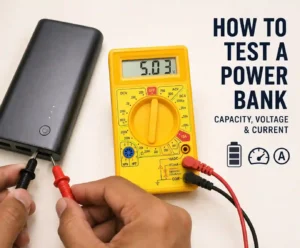
At a glance: For a usable-capacity test, fully charge the power bank, connect a USB power meter between the power bank and a controlled electronic load, then let the load run until the power bank shuts its output down. Record the delivered mAh and, preferably, Wh. Use a multimeter separately when you need to diagnose voltage or current.
How Do You Test A Power Bank?
The simplest reliable method is to match the testing tool to the measurement you need. A USB power meter measures the power bank’s output, while an electronic load provides a controlled demand. A multimeter is better for basic voltage and current diagnostics.
For a capacity test, follow this basic sequence:
- Fully charge the power bank.
- Connect a USB power meter to the power bank’s output.
- Connect an appropriate electronic load to the meter.
- Start a controlled discharge.
- Record voltage, current, mAh, and Wh when available.
- Allow the power bank to reach its normal output cutoff.
- Compare the measured energy with the expected stored energy.
This approach gives you a much better picture of usable performance than simply looking at the number printed on the case.
If your goal is only to check whether a port produces the expected voltage, you do not need to perform a complete capacity test. A correctly configured multimeter can handle that simpler job.
What Does A Power Bank Actually Measure?
Power banks are commonly labeled with capacity in milliamp-hours, or mAh. That number is useful, but it does not tell the whole story because energy also depends on voltage.
A typical lithium battery inside a power bank operates at a different voltage from the USB output. The power bank therefore needs electronic circuitry to convert the battery’s voltage into the voltage required by the connected device.
What Does mAh Mean On A Power Bank?
mAh means milliamp-hours. It describes an amount of electrical charge rather than energy by itself.
For example, a 10,000mAh battery stores more charge than a 5,000mAh battery when both are considered at the same voltage. However, comparing mAh values across different voltage levels can be misleading.
That distinction matters when you test a power bank. A tester connected to the USB output measures what is delivered through the output side of the power bank. The number may therefore be lower than the advertised internal battery capacity.
Why Advertised Capacity Is Higher Than Usable Output
The battery inside the power bank stores energy at its own operating voltage. The USB output may operate at another voltage. The power bank must convert between those levels, and the conversion is not perfectly efficient.
Some energy is lost in the conversion circuitry. Additional losses can come from the electronics, cable resistance, connectors, and the connected load.
That means a 20,000mAh power bank should not automatically be expected to deliver 20,000mAh at a USB output.
This is one of the most important concepts to understand when learning how to test a power bank. A lower measured output does not automatically mean that the manufacturer lied about the battery capacity.
The Difference Between mAh And Wh
Watt-hours, or Wh, are often more useful when comparing energy stored in a battery with energy delivered to a load.
The basic relationship is:
Wh = Ah × V
Because 1Ah equals 1,000mAh, the formula can also be written as:
Wh = (mAh ÷ 1,000) × V
For example, a nominal 10,000mAh battery at 3.7V represents approximately:
(10,000 ÷ 1,000) × 3.7 = 37Wh
That 37Wh figure represents the approximate stored energy under the stated nominal-voltage assumption. It does not mean that a USB load will receive exactly 37Wh.
The output electronics must convert the stored energy into the required output voltage. The resulting usable energy will depend on the efficiency of the complete system.
What Tools Do You Need To Test A Power Bank?
You do not need a laboratory to perform a useful power bank test. The equipment depends on whether you want to measure capacity, voltage, current, or charging behavior.
USB Power Meter Or USB Tester
A USB power meter is the most useful tool for a consumer capacity test. It sits between the power bank and the load and can measure values such as voltage and current. Better testers can also accumulate delivered mAh and Wh.
For capacity testing, look for a meter that can retain accumulated readings and display both current measurements and total delivered energy. USB-C support is also important if you are testing a modern USB-C power bank.
A USB tester that records Wh is particularly useful because energy measurements make it easier to compare stored energy with delivered energy.
Electronic Load
An electronic load acts like a controlled device that continuously draws power from the power bank. Unlike a phone, an electronic load can be configured to maintain a predictable current or power level.
That consistency makes repeated tests easier to compare. It also prevents the test from changing dramatically because a phone reaches a particular battery state or changes its charging behavior.
The load must be appropriate for the power bank and the USB tester. Never configure a load beyond the safe capability of the equipment.
Digital Multimeter
A digital multimeter is useful when you want to check voltage or investigate an electrical problem.
For example, you can use it to check whether an output is producing the expected voltage under a particular condition. You can also use a properly configured meter to measure current in series with a suitable load.
However, current measurement requires extra care. A multimeter configured for current measurement is designed to become part of the circuit. Connecting its current terminals directly across a power source can create a very low-resistance path and may blow the meter’s fuse, damage equipment, or create a safety hazard.
Cables And Other Accessories
Use cables that match the ports being tested and are in good condition. A damaged or unsuitable cable can introduce resistance, cause voltage drop, or prevent the expected charging mode from being established.
Alligator clips can be useful for certain electrical measurements, while a notebook or spreadsheet makes it easier to record test conditions and compare results.
How To Test Power Bank Capacity
The best way to test usable power bank capacity is to measure how much energy the power bank actually delivers to a controlled load. This is more meaningful than connecting the power bank to a phone and estimating the result from the phone’s battery percentage.
Step 1: Fully Charge The Power Bank
Start with a fully charged power bank. Use an appropriate charger and cable and allow the normal charging process to finish.
If the power bank has an indicator that shows 100%, wait according to the manufacturer’s normal charging behavior rather than assuming that the displayed percentage is a laboratory measurement of the internal cells.
Record the starting condition before beginning the discharge test.
Step 2: Connect The USB Power Meter And Load
The basic test arrangement is:
Power bank → USB power meter → electronic load
Connect the USB power meter to the power bank’s output. Then connect the electronic load to the output side of the meter.
Check the connector type before starting. USB-A and USB-C connections can have different capabilities, and USB-C does not automatically mean that the port supports USB Power Delivery.
USB-IF specifically distinguishes USB Type-C from USB Power Delivery. USB Type-C is a connector and cable interface, while USB Power Delivery is a power-management protocol that can support negotiated power levels.
Step 3: Start The Discharge Test
Configure the electronic load for an appropriate test condition. A moderate, controlled load is usually more useful for a consumer comparison than immediately pushing the power bank to its maximum advertised output.
Start the tester and record the initial voltage and current.
During the test, the USB meter should accumulate the energy delivered to the load. Depending on the tester, this may appear as mAh, Wh, or both.
Keep the setup stable. Do not repeatedly disconnect and reconnect the load because doing so can reset the meter or change the test conditions.
Step 4: Let The Power Bank Discharge
Continue the test until the power bank reaches its normal output cutoff.
Many power banks shut their output down when the battery reaches a low state or when the connected load falls outside the device’s expected operating range.
Do not assume that the moment the output turns off proves that every joule stored inside the battery has been extracted. The power bank’s protection and control circuitry determines when output stops.
Step 5: Record The Delivered Capacity
When the test ends, record the accumulated mAh and Wh shown by the USB tester.
Also record the test load and the output port used. These details matter because a capacity result without test conditions is difficult to reproduce or compare.
For example, if a 20,000mAh power bank delivers 13,500mAh through a particular USB output, that number should be described as the measured output under that test condition. It should not automatically be called the internal battery’s actual capacity.
Step 6: Calculate The Energy Efficiency
If you have a measured Wh value, compare it with the approximate stored energy of the battery.
For example, assume a 20,000mAh power bank is rated at a nominal 3.7V:
Stored energy = (20,000 ÷ 1,000) × 3.7 = 74Wh
If the USB tester records 63Wh delivered to the load, the approximate output-energy ratio is:
63Wh ÷ 74Wh × 100 = 85.1%
This is an estimate of the energy delivered through the tested output compared with the assumed stored energy. It is not a direct measurement of the battery cell’s internal efficiency.
Test conditions, nominal battery voltage, conversion behavior, cutoff thresholds, measurement accuracy, temperature, and other factors can affect the result.
Important: Do not judge a power bank by comparing its advertised mAh number directly with the mAh number shown by a USB tester. For a meaningful energy comparison, convert the battery rating to Wh and compare it with measured output Wh when available.
How To Test A Power Bank With A Multimeter
A multimeter is useful for checking electrical output, but it is not always the best tool for measuring a power bank’s complete capacity.
Use the multimeter when you need to answer questions such as, “What voltage is this port producing?” or “What current is flowing through this load?” Use a USB power meter when you want an accumulated capacity or energy measurement.
How To Test Output Voltage
Voltage is measured across two points in a circuit.
Set the multimeter to an appropriate DC-voltage range. Connect the black lead to COM and the red lead to the voltage terminal. Then measure across the appropriate positive and negative output points.
For a standard USB output operating at 5V, you would expect a reading around the specified output voltage. However, do not assume every USB-C port should always read 5V.
USB Power Delivery can negotiate different voltage and current levels. USB-IF’s source-power testing documentation includes tests for USB PD voltage transitions, current transitions, voltage drop, and over-current protection.
Therefore, the correct comparison is the measured voltage against the output mode that the power bank and connected equipment are supposed to establish.
How To Test Output Current
Current is measured through a circuit, not simply across the power source.
To measure current, the meter must be placed in series with the load. The current therefore flows through the meter as part of the circuit.
Before making a current measurement, select the correct current terminal and range. If the expected current is unknown, start within the meter’s highest appropriate range and work downward according to the meter manufacturer’s instructions.
Never connect the meter’s current input directly across the power bank’s output. Manufacturer documentation for digital multimeters warns that current measurement should be performed in series and that current terminals should not be connected in parallel across a circuit.
For a power bank test, a controlled load is preferable because it gives the current measurement a defined purpose. The connected load determines how much current the power bank actually supplies.
How To Test Charging Current
You can also measure the current entering a power bank during charging, provided the meter and setup are designed for that measurement.
The charging current is not necessarily constant from beginning to end. It can change as the battery charges, as the charger and power bank negotiate, and as the battery approaches a high state of charge.
Therefore, one current reading taken at the beginning of a charge should not be treated as the complete charging performance.
How To Interpret Your Power Bank Test Results
A test result is only useful when you understand what it represents.
What A Normal Voltage Reading Looks Like
Start by checking the specifications for the specific output port and charging mode.
A standard 5V output should remain close to its expected voltage during normal operation. However, the voltage can change under load or when a USB-C power-delivery contract changes.
A small amount of variation can occur. A large or persistent drop may indicate excessive load, cable resistance, internal resistance, protection behavior, or a problem with the power bank.
What A Low Capacity Result Means
A lower measured output does not immediately prove that the power bank is defective.
First check the test conditions. Verify the load, cable, output port, measurement method, and battery state. Then compare energy in Wh rather than comparing mAh values without considering voltage.
If the result remains unexpectedly low under a controlled and repeatable test, the power bank may have significant conversion losses, battery degradation, inaccurate labeling, or a hardware problem.
What A Large Voltage Drop Can Tell You
A large voltage drop under load can point to several possible causes.
- High internal resistance.
- A weak or aging battery.
- An overloaded output.
- A poor cable or connector.
- Protection circuitry reducing the output.
- A fault in the power bank’s output electronics.
Do not diagnose the exact cause from voltage alone. Use the reading as a clue and compare it with the power bank’s normal specifications and behavior.
When A Power Bank Should Be Replaced
Replacement becomes the safer choice when a power bank shows serious physical or electrical warning signs.
- Visible swelling.
- Cracked or damaged housing.
- Unusual heat during ordinary use.
- Smoke, odor, or leakage.
- Repeated unexpected shutdowns.
- Severe charging problems.
- Significant performance degradation.
Do not open a swollen or physically damaged lithium-ion power bank to investigate it. A damaged battery should not be treated as a normal DIY repair project.
How To Calculate Power Bank Wh From mAh
To calculate approximate stored energy from a power bank’s mAh rating, multiply the capacity in amp-hours by the nominal battery voltage.
Wh = (mAh ÷ 1,000) × nominal voltage
For a 10,000mAh power bank with a nominal battery voltage of 3.7V:
Wh = (10,000 ÷ 1,000) × 3.7 = 37Wh
This calculation gives an approximate stored-energy figure based on the stated nominal voltage.
Why Wh Is Better For Comparing Measured Energy
Wh includes voltage in the measurement, which makes it more useful for comparing energy across different voltage levels.
Suppose a tester reports that a power bank delivered 30Wh. That figure tells you how much energy reached the load during the test. It is more informative than simply saying that the tester measured a certain number of mAh without stating the output voltage.
For that reason, record Wh whenever your USB tester provides it.
How To Check If A Power Bank Is Good
A good power bank should provide stable, predictable performance that matches its stated capabilities under appropriate conditions.
Check The Advertised Capacity
Start with the manufacturer’s label and specifications. Note the stated capacity, input limits, output limits, and supported charging standards.
Then use your test results to determine how the actual output compares with the expected energy.
Check The Output Stability
Monitor the voltage and current during a controlled test. A stable output is generally more useful than a high number that cannot be maintained under load.
Pay attention to unexpected drops, repeated shutdowns, or unstable behavior.
Check The Charging Performance
A power bank should also charge in a predictable way with a suitable charger and cable.
Charging time depends on the power bank’s input capability, the charger’s output, the cable, the charging protocol, and the battery’s state of charge.
A power bank that supports a high-power charging standard cannot automatically draw that maximum power from every charger.
Check Physical Condition
Inspect the housing and ports before testing.
Look for swelling, cracks, loose connectors, corrosion, damaged cables, or other obvious problems. If the battery appears swollen or damaged, stop using it instead of attempting a capacity test.
How To Check Power Bank Battery Health
The best practical way to assess battery health is to compare performance over time rather than relying only on the power bank’s percentage indicator.
A power bank can report that it is full while its available capacity has already declined because of battery aging.
Compare Usable Capacity Over Time
Perform the same controlled capacity test under similar conditions and record the results.
If a power bank repeatedly delivers less usable energy than it did previously, the battery may be aging.
One test alone cannot always distinguish battery degradation from a cable, load, measurement, or charging problem. Repeated measurements are more useful.
Watch Charging And Discharging Behavior
Unexpected shutdowns, unusually short runtime, or major changes in charging behavior can provide additional clues.
These signs become more meaningful when they appear alongside a measurable decline in usable capacity.
Know When Testing Is Unsafe
Battery health testing is not worth the risk if the power bank is swollen, leaking, smoking, or becoming dangerously hot.
In those situations, stop using the power bank rather than trying to confirm its condition with additional tests.
How To Test Different Types Of Power Banks
Not every power bank behaves the same way. The testing method should reflect the ports and charging standards supported by the device.
How To Test A USB-C Power Bank
USB-C should not be treated as a synonym for USB Power Delivery.
USB-IF states that USB Type-C and USB Power Delivery are separate technologies. A USB-C product may support USB Power Delivery, but USB-C by itself does not guarantee that it does.
When testing a USB-C power bank, check the specifications for the particular port. If the port supports USB PD, the negotiated output can differ from a simple fixed 5V test.
Your USB tester should therefore support the charging modes you intend to measure. Otherwise, the test may not trigger the power bank’s higher-power output mode.
How To Test A Power Bank With Multiple USB Ports
Yes, testing each important output separately can be useful.
Different ports may have different capabilities. A power bank may have a standard USB-A output, a USB-C output, or multiple ports with different power limits.
Test each port under appropriate conditions and record which port produced each result.
If the manufacturer specifies a combined output limit when multiple ports are used simultaneously, perform a separate multi-port test as well.
Can You Test A Wireless Charging Power Bank?
You can test its wired USB output with a USB power meter and controlled load. Testing the wireless charging function itself is more complicated.
A USB meter on the power bank’s wired output does not directly tell you how much energy a phone receives through the wireless charging pad.
Wireless testing requires measuring energy on both sides of the wireless charging system. That makes it more complicated than a standard wired capacity test.
What Affects Power Bank Test Results?
Test results can change when the conditions change. That is why a controlled setup matters.
Voltage Conversion Efficiency
The power bank converts energy from its internal battery into the voltage required by the output. The conversion process has losses.
Those losses reduce the energy available to the connected load.
Load Level
A power bank may behave differently at a light load and a heavy load.
Higher loads can increase voltage drop and heat. Some power banks may also activate protection circuits when a load exceeds their limits.
Cable Resistance And Voltage Drop
Cables are part of the test system.
A poor cable can introduce additional resistance and voltage drop. For repeatable testing, use a suitable cable and keep the test setup consistent.
Battery Age And Charge Cycles
Rechargeable batteries lose usable capacity as they age. The rate depends on factors such as chemistry, temperature, charging behavior, discharge conditions, and usage history.
That is why an older power bank can produce a different result from the same model when new.
Temperature
Temperature can affect battery and electronic performance.
A power bank may become warm during a sustained discharge because some energy is converted into heat. Mild warmth can occur during normal operation, but excessive heat is a warning sign.
Charging Protocol And Negotiation
Modern USB-C power banks may negotiate power levels with a compatible charger or device.
USB-IF’s current document library includes the USB Power Delivery Revision 3.2 specification and dedicated compliance testing documents.
Therefore, a test performed with a basic USB connection may not represent the maximum performance available through a supported USB PD configuration.
Common Power Bank Testing Problems And Fixes
The Power Bank Does Not Start The Test
Check that the power bank is charged and that the load is connected correctly.
Some power banks require a minimum load before they activate their output. A load that is too small may therefore cause the power bank to shut down or remain inactive.
The USB Meter Shows 0mA
Check the cable, port, meter orientation, and load connection.
Also confirm that the power bank is actually supplying the output mode required by the tester and load.
The Voltage Keeps Fluctuating
Minor changes can occur, especially when the load changes or a charging protocol is negotiating.
Large fluctuations can indicate an unstable connection, excessive load, cable problems, protection behavior, or an internal fault.
The Power Bank Shuts Down Too Early
First check whether the load is appropriate.
Some power banks have protection circuits that shut the output down when the load is too high or too low. A faulty cable or connector can also interrupt the test.
If the same behavior continues with a controlled load and known-good cable, the power bank may have a problem.
The Power Bank Gets Very Warm
Some warmth during sustained power conversion is normal, but excessive heat is not something to ignore.
Stop the test if the power bank becomes unusually hot, smells abnormal, swells, smokes, or shows other warning signs.
The Measured Capacity Is Much Lower Than Expected
Do not immediately assume the printed capacity is false.
Check the battery’s starting state, load level, cable, output port, tester accuracy, and measurement units. Then repeat the test under the same conditions.
If repeated tests produce consistently poor results, the power bank may have degraded or may not be performing as specified.
How Many Charges Does A 30,000mAh Power Bank Provide?
A 30,000mAh power bank does not automatically provide a fixed number of full phone charges. The answer depends on the phone’s battery energy and the losses between the power bank and phone.
Start by converting the power bank’s nominal capacity to approximate energy.
For example:
(30,000 ÷ 1,000) × 3.7V = 111Wh
The phone will receive less than that stored energy because the power bank must convert its battery voltage and the phone has its own charging losses.
Therefore, the practical number of charges should be estimated from usable output energy rather than simply dividing 30,000mAh by the phone’s battery mAh rating.
How Long Does It Take To Charge A 10,000mAh Power Bank?
There is no single charging time for every 10,000mAh power bank.
Charging time depends on the power bank’s input limit, charger output, cable, charging protocol, battery state, and how the charging circuit reduces power near full charge.
A power bank with a higher input-power rating can potentially recharge faster than a model with the same capacity but a lower input limit.
To estimate charging time, first determine the approximate stored energy, then compare it with the actual input power while allowing for charging losses and the slower final stage of charging.
Power Bank Testing Safety Rules
Power banks contain rechargeable lithium batteries, so testing should be treated as an electrical and battery-safety task.
- Never exceed the voltage or current rating of the multimeter.
- Never connect a multimeter’s current terminals directly across a power source.
- Use the correct meter terminal and measurement mode.
- Use a suitable electronic load for capacity testing.
- Do not use damaged or swollen power banks.
- Do not short USB contacts.
- Use cables that are in good condition.
- Keep sustained high-load tests away from flammable materials.
- Do not leave an unfamiliar high-load test unattended.
- Stop immediately if the power bank becomes abnormally hot, swells, leaks, smokes, or smells unusual.
Current measurement requires particular care. Technical multimeter documentation warns that current measurement should be made in series and that the current terminals should not be connected in parallel across a circuit.
Safety first: A capacity test is optional. If a power bank shows physical damage, swelling, leakage, smoke, or severe overheating, do not continue testing it just to obtain a measurement.
Frequently Asked Questions About Testing A Power Bank
Can I Use Any Multimeter To Test A Power Bank?
Most general-purpose digital multimeters can check basic DC voltage, but current testing requires the correct current range, terminals, and rating. For capacity testing, a USB power meter is usually more convenient because it can accumulate delivered mAh or Wh.
Always check the meter’s specifications before measuring current.
How Do I Know If My Power Bank Is Fully Charged?
The simplest method is to use the power bank’s charging indicator and allow its normal charging cycle to finish. A display showing 100% is useful, but it does not directly measure battery health or confirm the exact stored energy.
For capacity testing, use the same full-charge procedure each time so your results remain comparable.
How Do I Test The Capacity Of A Power Bank?
Fully charge the power bank, connect a USB power meter to an appropriate controlled load, and discharge the power bank until its output shuts down. Record the accumulated mAh and Wh and compare the measured energy with the expected stored energy.
This is more useful than estimating capacity from how many times a phone can be charged.
Should I Test Every USB Port?
Yes, if you want to understand the performance of a multi-port power bank. Test each important output separately because ports can have different specifications.
If the manufacturer provides a combined output limit, also test the ports together when that information is relevant to your use.
Can I Test A Wireless Charging Power Bank?
You can test its wired USB output with a USB power meter and load. However, directly measuring wireless charging efficiency requires additional measurements because the USB tester does not measure the energy actually received by the phone through the wireless charging system.
Is It Normal For A Power Bank To Get Warm During Testing?
Some warmth can occur during sustained charging or discharging because electronic conversion produces heat. However, excessive or rapidly increasing heat is not normal.
Stop the test if the power bank becomes dangerously hot, swells, leaks, smokes, or shows other signs of damage.
How Do I Know If A Power Bank Is Still Good?
Check its physical condition, charging behavior, output stability, and usable capacity. A controlled capacity test gives stronger evidence than the percentage indicator alone.
If performance has declined substantially over repeated comparable tests, the battery may have aged.
Can I Test A Power Bank Without A USB Load Resistor?
Yes. You can use another suitable USB-powered device as a load, but the result will be less controlled because the device may change its current demand during the test.
An electronic load is better when you want repeatable measurements.
How Do I Calculate Power Bank Wh?
Use the approximate formula Wh = (mAh ÷ 1,000) × nominal voltage. For example, 10,000mAh at 3.7V equals approximately 37Wh.
Remember that this estimates stored energy. The USB output will normally deliver less energy because the power bank’s electronics and the complete charging path have losses.
Final Thought
The best way to test a power bank depends on what you want to know. For usable capacity, a USB power meter paired with a controlled electronic load gives the most useful consumer-level measurement. For voltage and current diagnostics, a correctly configured multimeter is the better choice.
Most importantly, do not compare the printed mAh rating directly with the mAh shown at the USB output. Consider voltage, Wh, conversion losses, load conditions, cable quality, and battery condition before deciding whether a power bank is performing well.
If you record your test conditions and repeat the same method over time, you can also use the results to spot battery degradation. And if a power bank becomes swollen, damaged, or excessively hot, safety matters more than completing the test.
Start with the measurement you actually need: capacity requires a controlled discharge test, while voltage and current checks require the appropriate electrical measurement setup.