
Using an Onn power bank is straightforward: charge the power bank, turn it on if your model has a power button, connect your device, and check the LED indicators. If you are wondering how to use onn power bank, the correct process depends slightly on your Onn model, especially when turning the charger on or off.
For most models, start by charging the power bank through its supported input port. Then connect your phone or another compatible device using the correct cable. If charging does not begin automatically, press the power button once.
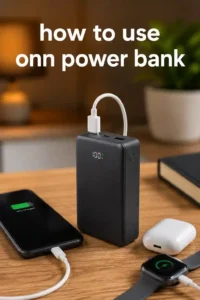
How to Use an Onn Power Bank
To use an Onn power bank, charge it first, activate it when required, connect your device, and monitor the charging indicators. Most models are designed to begin supplying power automatically after a compatible device is connected.
Related Posts
 | How to Test a Power Bank: Capacity, Voltage & Current |
 | How to Choose a Portable Power Bank: Complete Guide |
 | How to Choose the Right Power Supply for PC |
- Charge the Onn power bank through its input port.
- Disconnect the charger after the battery is charged.
- Connect your phone or other USB device with a compatible cable.
- Press the power button if your model does not start charging automatically.
- Check the LED indicators to confirm that power is being supplied.
- Disconnect the device when charging is complete.
For a broader buying guide, see our guide to choosing a portable power bank.
How to Turn On an Onn Power Bank
To turn on an Onn power bank, press the power button if your model has one, then connect the device you want to charge. Some Onn models can activate automatically when they detect a compatible device.
Onn Power Banks With a Power Button
If your model has a physical power button, press it once to activate the power bank. Then connect your phone or another compatible device.
If the LEDs illuminate after pressing the button, the power bank has activated. Connect the charging cable if you have not already done so.
Onn Power Banks That Activate Automatically
Some models can detect a connected device and begin supplying power without a separate activation step. Connect the device with a compatible cable and check the indicator lights.
If the device does not charge, press the power button once if your model includes one. Also check the cable and both charging ports.
Onn Portable Charger How to Turn On
If you are searching for onn portable charger how to turn on, the same basic procedure applies: connect a compatible device and press the power button when the model requires manual activation.
How to Turn Off an Onn Power Bank
To turn off an Onn power bank, stop charging the connected device and use the power button if your model provides manual shutoff. Some models turn off automatically after they stop detecting a meaningful power draw.
How to Turn Off an Onn Power Bank With a Button
If your model has a power button with manual control, follow the instructions supplied with that model for stopping output. Avoid repeatedly pressing the button when the correct operation is uncertain.
Once output stops, the LED indicators should change according to the model’s design. Check the user manual if the indicator behavior differs.
Automatic Shutoff
Some Onn power banks automatically stop supplying power when a connected device is no longer drawing enough current. This feature helps conserve the stored battery.
As a result, you may not need to manually switch off every Onn power bank after charging. Disconnect the charging cable when your device is finished.
How to Turn Off an Onn Portable Charger
If you searched for how to turn off onn portable charger, first disconnect the device being charged. If the power bank continues operating, follow the shutdown procedure for your specific model rather than assuming every Onn charger uses the same button sequence.
How to Charge an Onn Power Bank
To charge an Onn power bank, connect its supported input port to a compatible wall charger and leave it connected until the charging indicators show that the battery is full. The required cable depends on the Onn model.
Using USB-C to Charge an Onn Power Bank
Newer Onn power banks may use USB-C for recharging. Connect the USB-C cable to the power bank’s supported input port and connect the other end to a suitable wall charger.
USB-C can provide faster input charging on compatible models. However, the actual charging speed depends on the power bank’s supported input rating and the charger being used.
Using Micro-USB to Charge an Onn Power Bank
Older Onn power banks may use Micro-USB for recharging. Connect the Micro-USB cable securely and use a reliable USB wall charger.
If charging repeatedly stops, inspect the cable and connector. A worn cable can cause intermittent charging even when the power bank itself works normally.
How Long Does an Onn Power Bank Take to Charge?
Charging time depends on the Onn power bank’s capacity, supported input power, charger, and cable. A 10,000mAh model can take several hours to recharge, while a lower-powered adapter may take longer.
Do not assume that every Onn power bank has the same charging time. Check the specifications for your exact model when precise charging time matters.
Which Charger Should You Use?
Use a reputable wall charger that matches the Onn power bank’s supported input specifications. A suitable charger provides stable power and helps avoid unnecessary charging interruptions.
Using a damaged or poor-quality cable can also cause slow or inconsistent charging. Replace worn cables before troubleshooting the power bank itself.
How Do I Know When My Onn Power Bank Is Fully Charged?
The Onn power bank is fully charged when its charging indicators show the full-charge status specified for your model. Many models use LEDs, but indicator behavior can vary between versions.
What the LED Indicators Mean
LED indicators show the power bank’s charging or remaining battery status. Flashing lights commonly indicate active charging, while steady lights can indicate stored battery capacity.
Because Onn models can use different indicator systems, check the manual for your exact power bank before interpreting a particular flashing pattern.
What Does a Flashing LED Mean?
A flashing LED usually indicates charging activity or a changing battery status. Flashing does not automatically mean that the power bank is defective.
If the lights continue flashing for an unusually long time without charging progress, check the wall charger, cable, and charging port.
How to Charge a Phone With an Onn Power Bank
To charge a phone with an Onn power bank, connect the phone to a compatible output port using the correct charging cable. Press the power button if charging does not begin automatically.
Charging Android Phones
Most modern Android phones use USB-C. Connect a compatible USB-C cable to the appropriate output port on the Onn power bank.
Some newer Onn models may support faster charging through compatible USB-C output. The phone, cable, and power bank must support the required charging standard for higher speeds.
Charging iPhones
Older iPhones generally require a Lightning cable, while newer USB-C iPhone models use USB-C connections. Use a compatible, reliable cable for stable charging.
If an iPhone does not begin charging, check the cable connection and try another compatible output port when available.
Charging Tablets and Accessories
An Onn power bank can charge many USB-powered tablets and accessories. Charging speed depends on the device’s power requirements and the power bank’s available output.
Wireless earbuds, smartwatches, fitness trackers, and other low-power accessories generally require less energy than phones or tablets.
USB-A vs USB-C on an Onn Power Bank
USB-C is generally the better choice for newer devices when the Onn power bank and connected device support compatible fast-charging standards. USB-A remains useful for older or widely compatible USB accessories.
USB-A Output
USB-A provides broad compatibility with many older phones, speakers, accessories, and charging cables. Its charging performance depends on the specific Onn model and output rating.
USB-C Output
USB-C supports newer charging standards and can provide higher charging performance on compatible Onn models. USB-C does not automatically mean that every device will charge at the same speed.
Power Delivery Support
Some Onn power banks support USB Power Delivery through USB-C. When supported by the power bank, phone, and cable, PD can negotiate an appropriate charging level.
For more information about charging technologies, see our guide to Power Delivery and GaN charging.
Onn Power Bank Troubleshooting
Most Onn power bank problems can be narrowed down by checking the cable, charger, port, battery level, and connected device. Troubleshoot the simplest possible cause first.
Onn Power Bank Won’t Turn On
If an Onn power bank won’t turn on, charge it first and then check the power button, cable, and charging indicators. A deeply discharged battery may need time before the LEDs respond.
Try another compatible charging cable and wall adapter if the power bank remains unresponsive. If there is still no response, inspect the charging port for visible damage or debris.
Onn Power Bank Won’t Turn Off
If an Onn power bank won’t turn off, disconnect the connected device and check whether the model uses automatic shutoff or a manual power button. Some models continue operating briefly while they determine whether a device is still drawing power.
If the power bank remains active unexpectedly, consult the instructions for the exact model before repeatedly pressing the button.
Onn Power Bank Not Charging
If an Onn power bank is not charging, test the charging cable, wall adapter, power source, and input port. A damaged cable is one of the simplest causes to eliminate.
Connect the power bank to another compatible wall charger and leave it connected for a reasonable period. If the LEDs remain completely unresponsive, the battery or charging hardware may require further inspection.
Phone Is Not Charging
If your phone is not charging from an Onn power bank, check the cable, output port, phone charging port, and power-bank battery level. Then reconnect the cable securely.
If another compatible cable works, the original cable was likely the problem. Also try another output port when the power bank provides more than one.
Why Is My Onn Power Bank Blinking?
If your Onn power bank is blinking, the lights may be indicating active charging, battery status, or another operating condition. The exact meaning depends on the model.
Check whether the connected device is charging normally. If the lights continue blinking while no useful charging occurs, test another cable and charger.
Why Is My Onn Power Bank Charging Slowly?
Slow charging can result from a low-power charger, unsuitable cable, older USB connection, or the connected device’s charging requirements. Use compatible equipment and the appropriate output port.
If you need to determine whether a power bank is working correctly, see our guide on how to test a power bank.
Can an Onn Power Bank Charge Two Devices at Once?
Many Onn power bank models can charge two devices simultaneously when they provide multiple output ports. However, the available output may be shared between connected devices.
As a result, two devices may charge more slowly than one device connected alone. Check the specifications of your exact model for its maximum combined output.
Can You Charge a Phone While Charging the Onn Power Bank?
Some power banks support pass-through charging, but support varies by model. Do not assume that every Onn power bank can charge a connected phone while the power bank itself is recharging.
If simultaneous charging is important, verify pass-through support in the specifications or manual for your exact Onn model.
How to Make an Onn Power Bank Last Longer
Keep the Onn power bank cool, avoid unnecessary deep discharges, use reliable cables, and store it properly when it is not being used. These habits can help preserve rechargeable battery capacity over time.
Avoid Excessive Heat
Heat can accelerate battery degradation. Keep the power bank away from direct sunlight, hot vehicles, and other high-temperature environments.
Avoid Frequent Deep Discharges
Recharge the power bank before it remains completely empty for extended periods. Normal lithium-battery use does not require repeatedly draining the battery to zero.
Use Reliable Charging Cables
Replace cables that are frayed, loose, or intermittently connected. A damaged cable can cause charging interruptions and make a working power bank appear faulty.
Store It Properly
Store the power bank in a cool, dry location when it is not being used. Avoid leaving it exposed to direct sunlight or extreme temperatures.
What Should You Avoid When Using an Onn Power Bank?
Avoid incompatible chargers, damaged cables, extreme heat, and devices that exceed the power bank’s supported output. Using the correct equipment reduces charging problems and unnecessary battery stress.
- Do not use visibly damaged charging cables.
- Do not leave the power bank in a hot parked vehicle.
- Do not assume every USB-C port supports the same charging speed.
- Do not exceed the power bank’s published output specifications.
- Do not ignore unusual behavior such as overheating or visible damage.
When Is an Onn Power Bank Useful?
An Onn power bank is useful whenever a compatible device needs portable power away from a wall outlet. Common situations include commuting, travel, outdoor activities, and temporary power outages.
Travel and Commuting
A portable charger can provide backup phone power during long journeys and daily commutes. Keep the power bank accessible so you can recharge when needed.
Outdoor Activities
A charged power bank can help keep phones and other compatible USB devices operating during outdoor activities. Store the battery away from excessive heat and moisture.
Power Outages
An Onn power bank can provide temporary backup power for compatible small electronics during an outage. Keep it charged before an expected interruption.
Onn Power Bank FAQs
How do I use an Onn power bank?
To use an Onn power bank, charge it, connect your device with the correct cable, and press the power button if your model requires activation. Then check the LEDs to confirm that charging has started.
How do I turn on an Onn power bank?
Press the power button on models that require manual activation, then connect your device. Some models activate automatically when they detect a compatible device.
How do I turn off an Onn power bank?
Disconnect the connected device and allow automatic shutoff if your model uses it, or follow the manual power-button procedure for models with manual control. Onn power bank behavior can vary between models.
How to charge an Onn power bank?
Connect the supported input port to a compatible wall charger and leave it connected until the charging indicators show a full battery. Use USB-C or Micro-USB according to your model.
How do I know when my Onn power bank is fully charged?
Check the LED indicators for the full-charge pattern specified by your model. Flashing lights commonly indicate charging, while steady lights may indicate stored capacity.
Why is my Onn power bank blinking continuously?
Continuous blinking may indicate active charging or another battery-status condition. If charging does not progress, test the cable, wall adapter, and charging port.
Why is my Onn power bank not charging?
The cable, wall charger, input port, power source, or deeply discharged battery can prevent an Onn power bank from charging. Test the easiest components first before assuming the power bank has failed.
Can an Onn power bank charge two devices at once?
Many Onn models can charge two devices simultaneously when they provide multiple output ports. The available output may be shared, which can reduce charging speed.
Does an Onn power bank support fast charging?
Some newer Onn models support faster charging standards through USB-C. Fast charging requires compatibility between the power bank, connected device, and charging cable.
How long does an Onn power bank last?
An Onn power bank can remain useful for years when it is protected from excessive heat and physical damage. Battery capacity naturally declines with use and age.
Can I take an Onn power bank on an airplane?
Airline rules for lithium-ion power banks depend on the battery’s capacity and the airline’s current requirements. Check the airline’s latest baggage rules before traveling and keep permitted power banks in carry-on baggage when required.
Final Thought
Learning how to use onn power bank correctly starts with three basics: charge the battery, activate it when necessary, and connect the right device and cable. The most important detail is that Onn models can differ in their power-button, LED, port, charging, and automatic-shutoff behavior.
If your Onn power bank will not turn on, will not turn off, or will not charge, check the cable, charger, ports, battery level, and model-specific instructions before assuming the hardware has failed.
For broader portable-charger buying guidance, continue with our guide to choosing a portable power bank.