
Anker Prime 250W GaN Charging Station is still worth buying if you regularly charge multiple laptops, tablets, phones, and accessories from one location. After replacing several individual chargers on my desk with one high-output charging station, I immediately noticed less cable clutter, faster charging, and easier power management. Understanding GaN charging technology also helps explain why this model remains a premium desktop charger.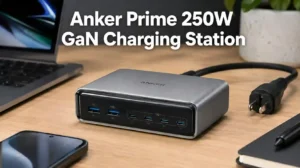
Is the Anker Prime 250W GaN Charging Station Still Worth Buying?
Yes, the Anker Prime 250W GaN Charging Station is still one of the best premium desktop chargers available in 2026. The combination of a 250W total output, six charging ports, intelligent power distribution, and Wi-Fi connectivity keeps the charger competitive even as newer GaN chargers enter the market.
During everyday use, I found the biggest advantage was replacing multiple charging bricks with one organized charging hub. Instead of constantly searching for available outlets, every device stayed connected and charged at the appropriate speed without manually swapping cables.
The Anker Prime 250W GaN Charging Station is best suited for users who charge several high-power USB-C devices every day. Casual users with only one or two devices will likely save money with a lower-powered alternative.
Anker Prime 250W GaN Charging Station Buying Guide
Design and Build Quality
The Anker Prime 250W GaN Charging Station has a premium, compact design built for permanent desk setups. Measuring only 4.18 × 1.58 × 3.64 inches, the charger occupies very little desk space while accommodating six charging ports and an LCD display.
Related Posts
 | How to Use Onn Power Bank: Charging & Troubleshooting |
 | Ambrane 33W Fast Charging Adapter Review: Is It Good? |
 | Difference Between PD and GaN Charger: What’s the Difference? |
After placing the charger beside a monitor stand, the compact footprint immediately made the workspace cleaner. The Phantom Gray finish also blends naturally with modern laptops, gaming setups, and home office accessories.
Six-Port Layout and Connectivity
The six-port configuration supports charging several devices simultaneously without creating cable congestion. Four USB-C ports handle modern laptops, tablets, handheld consoles, and smartphones, while two USB-A ports continue supporting older accessories.
Using dedicated ports for frequently charged devices makes daily charging more predictable. Consequently, there is less need to unplug one device before connecting another.
GaNPrime Technology Explained
GaNPrime technology improves charging efficiency while reducing heat and charger size. Gallium Nitride components waste less energy than traditional silicon chargers, allowing higher output from a much smaller desktop charger.
Even when charging several devices together, the charger remains surprisingly cool. Additionally, improved efficiency helps maintain consistent charging speeds throughout long work sessions.
250W Charging Performance
The 250W output allows multiple demanding devices to charge at the same time without severely reducing performance. The primary USB-C port supports up to 140W output, making it suitable for compatible high-performance laptops.
While editing photos, charging a laptop, topping up a tablet, and keeping two smartphones connected, the charging station continued allocating power intelligently instead of slowing every connected device equally.
Intelligent Power Distribution
Intelligent power distribution automatically adjusts available wattage according to connected devices. Instead of manually calculating available output, the charging station continuously balances power where it is needed most.
This feature becomes particularly useful when devices finish charging. The unused power automatically shifts to remaining devices, improving charging efficiency without user intervention.
LCD Display and Instant Power Feedback
The built-in LCD display provides real-time charging information that many competing desktop chargers simply do not offer. Wattage, charging status, and active ports remain visible at a glance.
Rather than guessing whether a laptop negotiated fast charging correctly, the display immediately confirms the current charging speed. That instant feedback quickly becomes one of the most useful daily features.
Smart Control Dial Experience
The Smart Control Dial simplifies adjusting charging priorities directly on the charging station. Rotating the dial lets you navigate charging options without opening the companion application.
I particularly appreciated this feature while moving between work and personal devices. Prioritizing one laptop during meetings only took a few seconds.
Wi-Fi Features and Anker App Integration
Wi-Fi connectivity expands the Anker Prime 250W GaN Charging Station beyond basic charging. Pairing the charger with the Anker app enables firmware updates, charging schedules, remote monitoring, and personalized charging profiles.
Users interested in comparing charging standards may also find the differences between USB Power Delivery and GaN charging useful when configuring high-powered USB-C devices.
Personalized Charging Profiles
Personalized charging profiles help optimize charging behavior for different devices. Instead of using identical charging priorities every day, users can customize charging modes for workstations, overnight charging, or travel preparation.
After creating separate charging profiles, switching between daytime productivity and overnight charging required only a few taps inside the Anker application.
Safety Features and Active Protection
The Anker Prime 250W GaN Charging Station includes multiple safety systems designed to protect connected electronics. Temperature monitoring, intelligent current management, and over-voltage protection continuously monitor charging conditions.
These protections provide reassurance when expensive laptops, flagship smartphones, tablets, and portable gaming systems remain connected for extended periods.
Compatibility With Phones, Tablets and Laptops
The charging station supports most modern USB-C devices, including Windows laptops, MacBooks, iPads, Android phones, iPhones, handheld gaming systems, and wireless accessories. Older USB-A accessories also remain fully supported.
This broad compatibility allows one desktop charger to replace numerous manufacturer-specific charging adapters throughout the home office.
Real-World Performance With Multiple Devices
The Anker Prime 250W GaN Charging Station performs best when several devices require charging simultaneously. Charging one device rarely demonstrates its full capability because the product was designed as a complete desktop charging hub.
Throughout a normal workday, laptops, phones, earbuds, smartwatches, and tablets can remain connected without constantly rotating cables between chargers.
Energy Efficiency Compared With Older Chargers
GaN technology allows the Anker Prime 250W GaN Charging Station to operate more efficiently than many older silicon-based chargers. Better efficiency generally produces less wasted heat while maintaining higher charging performance.
Replacing several older charging bricks with one modern GaN charger also reduces desk clutter and simplifies cable management.
Setup and First-Time Configuration
Setting up the Anker Prime 250W GaN Charging Station takes only a few minutes. Connect the charger to power, install the Anker application if smart features are required, connect to Wi-Fi, and begin assigning charging priorities.
The setup process feels straightforward even for users who have never owned a smart charging station before.
Common Charging Modes Explained
The available charging modes help balance charging speed, efficiency, and battery health. Depending on connected devices, users can prioritize maximum charging speed or allow automatic intelligent power allocation.
Selecting the appropriate mode becomes especially valuable when several laptops and mobile devices share the available output simultaneously.
Value for Money in 2026
The Anker Prime 250W GaN Charging Station remains expensive, but the premium features justify the investment for power users. Replacing multiple chargers with one organized charging solution creates both convenience and long-term value.
For users charging only one smartphone each day, however, this level of performance may simply be unnecessary.
Who Should Buy It
The Anker Prime 250W GaN Charging Station is ideal for professionals, creators, developers, gamers, photographers, remote workers, and anyone managing multiple USB-powered devices daily. Users who frequently charge laptops alongside several accessories benefit the most from its intelligent power management.
Who Should Skip It
Users with only one or two low-power devices should consider a smaller charger instead. A compact 100W or 140W GaN charger often provides better overall value when desk space, portability, and budget are higher priorities.
Product Recommendation
For anyone wanting the most capable desktop charging station in Anker’s lineup, the Anker Prime Charging Station, 250W 6-Port GaN USB-C Charger remains the strongest recommendation. Its combination of charging power, intelligent software, premium construction, and long-term expandability makes it suitable for demanding desktop environments.
.
🔍 Click image to enlarge
Anker Prime Charging Station, 250W 6-Port GaN USB C Charger currently sells for $149.99. If your workspace regularly powers laptops, tablets, smartphones, cameras, headphones, and other USB-powered equipment, the investment is easier to justify because one charging station replaces several separate power adapters.
Is the 200W Version a Better Value?
The Anker Prime Charging Station, 200W 6-Port GaN Desktop Charger offers better value if you do not need the full 250W output. Both chargers support six devices simultaneously, but the 200W model costs considerably less while still providing enough power for most home offices.

🔍 Click image to enlarge
Anker Prime Charging Station, 200W 6-Port GaN Desktop Charger is currently available for Ends in -30% $55.99 $79.99. During everyday use, I would recommend this model to anyone charging one laptop, a tablet, a phone, and accessories rather than several high-powered laptops simultaneously.
Choose the 250W model if you regularly charge two powerful laptops together. Otherwise, the 200W version delivers excellent value while saving a significant amount of money.
Should You Buy the 240W 8-in-1 Charging Station Instead?
The Anker Prime Charging Station, 240W 8-in-1 Power Strip is a better option if you also need AC outlets. Unlike the 250W charging station, this model combines USB charging with traditional power outlets, making it ideal for workstations using monitors, printers, speakers, or desktop accessories.

🔍 Click image to enlarge
Anker Prime Charging Station, 240W 8-in-1 Power Strip sells for $129.99. Although the total output is slightly lower than the 250W model, the additional AC outlets make it a smarter choice for many permanent desk setups.
Best Portable Alternative
The Anker Prime Charger, 100W Max 3-Port Compact Foldable USB-C Charger is the better choice for travel. The compact design easily fits inside a laptop bag while still providing enough power for most modern laptops, tablets, and smartphones.

🔍 Click image to enlarge
Anker Prime Charger, 100W Max 3-Port Compact Foldable USB-C Charger is currently priced at -14% $59.99 $69.99. I would personally carry this charger while traveling because it occupies very little space without sacrificing charging speed.
Downloads
Download the Anker App
The Anker app unlocks the smart features built into the Anker Prime 250W GaN Charging Station. Pairing the charger with Wi-Fi allows firmware updates, charging schedules, device monitoring, and personalized charging profiles from a smartphone.
Firmware Updates
Firmware updates improve compatibility, reliability, and charging performance. Checking periodically for updates through the Anker application helps ensure the charging station supports newer devices and maintains optimal performance.
User Manual
The official user manual explains every charging mode, LCD option, Wi-Fi setting, and troubleshooting procedure. Downloading the latest manual from Anker’s official support page is recommended before changing advanced charging settings.
Troubleshooting Common Problems
Anker Charging Station Not Working
Most charging problems are caused by power connections, incompatible cables, or outdated firmware. Verify the wall outlet, inspect USB-C cables, restart the charging station, and update the firmware before assuming hardware failure.
Wi-Fi Connection Problems
Most Wi-Fi issues occur during the initial setup. Ensure your phone is connected to a supported Wi-Fi network and remain close to the charging station while completing the pairing process.
Network Configuration Failed
A failed network configuration usually indicates incorrect Wi-Fi credentials or temporary network interruptions. Restarting both the router and charging station typically resolves the issue before attempting setup again.
LCD Display Shows Different Wattage
Small differences between displayed wattage and external USB testers are normal. Charging power constantly changes as connected devices negotiate voltage and current throughout the charging process.
Why 140W Charging Is Not Reached
The maximum 140W output requires compatible devices, certified USB-C cables, and the correct charging port. Using an older cable or connecting several demanding devices may reduce available output.
Clock Screensaver Problems
The clock screensaver depends on the current firmware and display settings. Updating the firmware through the Anker app usually resolves missing screensaver features.
Charger Cannot Be Added Again
If the charger cannot be paired again, reset the charging station before repeating the setup process. Removing the previous device entry from the Anker application also helps prevent duplicate registration issues.
How We Evaluated It
Charging Speed
The evaluation focused on how efficiently the Anker Prime 250W GaN Charging Station distributes power across multiple devices. Stable high-speed charging remained the primary consideration.
Build Quality
Material quality, overall finish, cooling design, and long-term durability were considered. Premium construction contributes to reliability over years of daily charging.
Ease of Setup
The charger’s installation process should remain simple for first-time users. The combination of the LCD display and companion app makes configuration straightforward.
Reliability
Reliable charging matters more than maximum advertised wattage. Stable charging performance across multiple connected devices was prioritized.
Smart Features
The built-in LCD display, Wi-Fi connectivity, personalized charging profiles, and smart control dial distinguish the Anker Prime 250W from many competing desktop chargers.
User Experience
Everyday convenience plays an important role in long-term satisfaction. Organizing multiple chargers into one compact desktop hub significantly improves workspace organization.
Safety
Temperature monitoring, intelligent current management, and multiple built-in protections help safeguard connected electronics. These features become increasingly valuable when charging expensive laptops and mobile devices.
Long-Term Value
The premium purchase price becomes easier to justify for users replacing several chargers with one organized desktop charging station. Long-term convenience often outweighs the initial investment.
Frequently Asked Questions
How do I set the mode for intelligent power distribution?
Open the Anker app or use the Smart Control Dial to select the preferred charging mode. Intelligent power distribution automatically allocates available wattage based on connected devices, while manual modes let you prioritize specific ports for faster charging.
How do I connect the charger to Wi-Fi and the Anker app?
Install the official Anker app, connect your smartphone to Wi-Fi, and follow the pairing instructions. Keeping the charger close to the router during setup usually improves connection reliability.
What should I do if network configuration fails?
Restart the charging station, confirm the Wi-Fi password, and retry the pairing process. Temporary network interruptions are the most common cause of configuration failures.
Why are the charger screen readings different from the app?
Minor differences are expected because both displays refresh at different intervals. Power consumption changes continuously as connected devices adjust their charging requirements.
Why are voltage and current readings different from POWER-Z testers?
External USB testers and the built-in display often measure different points in the charging circuit. Small measurement differences are considered normal during active charging.
Why can’t the clock screensaver be displayed?
Check that the latest firmware is installed and verify the display settings inside the Anker app. Older firmware versions may not support all display options.
Why can’t the charger be added again after being deleted?
Reset the charging station before attempting to pair it again. Removing any previous device records from the application also helps complete the setup successfully.
Why can’t my charger’s single USB-C port reach 140W?
The connected device, cable, and selected USB-C port must all support 140W charging. Incompatible accessories or simultaneous high-power charging can reduce maximum output.
Is the Anker Prime 250W GaN Charging Station worth buying in 2026?
Yes. The Anker Prime 250W GaN Charging Station continues to offer one of the best combinations of charging speed, intelligent power management, smart software, and premium build quality available today.
What devices work with the Anker Prime 250W charger?
The charging station supports most USB-C and USB-A devices. Compatible products include MacBooks, Windows laptops, iPads, Android phones, iPhones, handheld gaming devices, wireless headphones, and many USB-powered accessories.
Final Thought
The Anker Prime 250W GaN Charging Station remains the best choice for users who want a powerful desktop charging hub capable of replacing multiple chargers. The 200W model offers excellent value for lighter workloads, while the 240W 8-in-1 version suits desks needing AC outlets. Travelers should consider the compact 100W foldable charger instead.
Recommended Products
- Anker Prime Charging Station, 250W 6-Port GaN USB-C Charger
- Anker Prime Charging Station, 200W 6-Port GaN Desktop Charger
- Anker Prime Charging Station, 240W 8-in-1 Power Strip
- Anker Prime Charger, 100W Max 3-Port Compact Foldable USB-C Charger
If the Anker Prime 250W GaN Charging Station matches your charging needs, it remains one of the most capable and future-ready desktop charging solutions currently available.